Ledger and Trezor are the two names that come up first whenever someone asks how to store crypto offline. Both are hardware wallets, both keep your private keys away from the internet, and both have years of track record behind them. Where they split apart is how each one actually treats Solana. Ledger built a dedicated Solana app with native staking and a direct line into Phantom and Solflare. Trezor only added SOL support in December 2023, and even now it comes with real gaps around staking and dApp access. This guide covers the security architecture, the hack history, the recovery systems, the actual setup steps, and the Solana specific gaps that most general comparisons skip over entirely.
Ledger vs Trezor at a glance for Solana holders
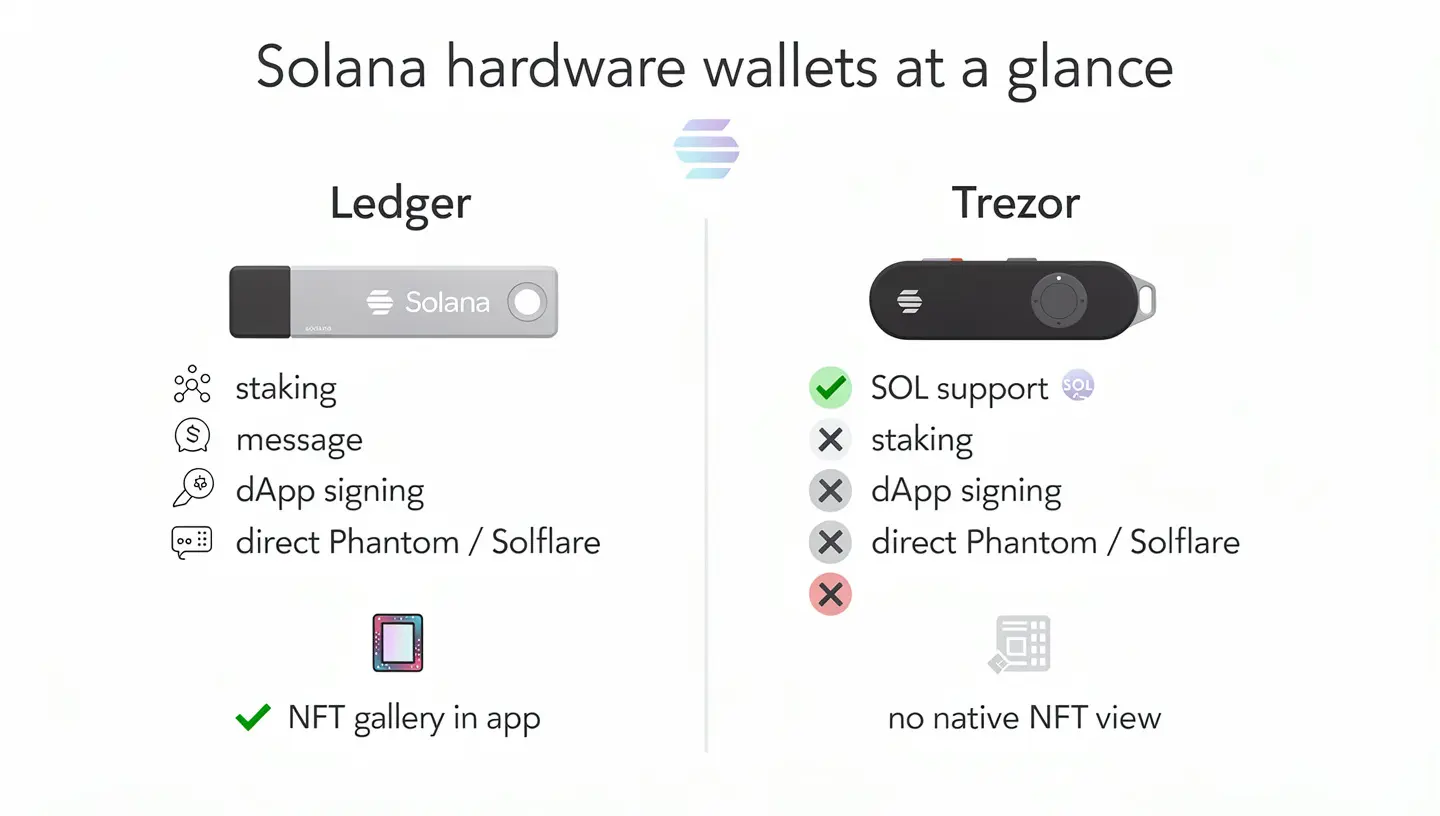
Before getting into the details, here is where each device actually stands when SOL is the asset you care about.
| Feature | Ledger | Trezor |
|---|---|---|
| SOL support added | From launch (Solana app) | December 2023 |
| Models that support SOL | Nano S Plus, Nano X, Nano Gen5, Flex, Stax | Model T, Safe 3, Safe 5, Safe 7 (not Model One) |
| Native SOL staking | Yes, through Ledger Live | Not available yet |
| Solana dApp message signing | Supported | Not supported |
| Connects directly to Phantom or Solflare | Yes | Only through a third app such as NuFi |
| Solana NFT display | Gallery view in Ledger Live | No native interface |
What is Ledger and what is Trezor?
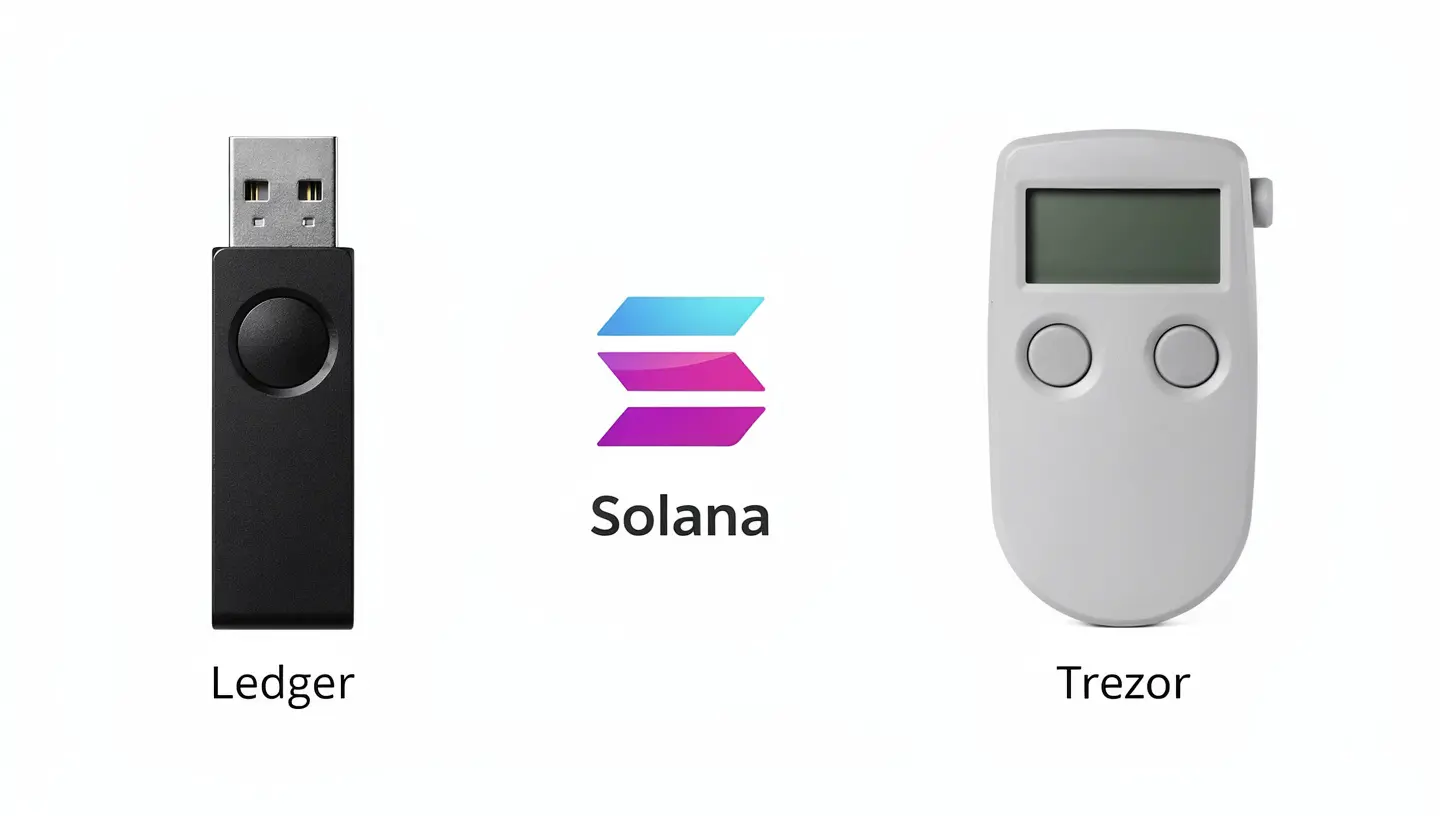
Both brands have been around since the early years of consumer hardware wallets, and that history shapes how each one approaches a newer chain like Solana.
Ledger’s background
Ledger is a French company that shipped its first device, the Ledger Nano S, in 2016. The company has since shipped more than 8 million units across over 200 countries and built out a full lineup that now includes the Nano S Plus, Nano X, Nano Gen5, Flex, and Stax. Ledger runs an internal security research team called Ledger Donjon, which tests Ledger’s own hardware as well as competing devices, including Trezor, and has published disclosures based on that testing.
Trezor’s background
Trezor was built by the Prague based company SatoshiLabs and launched the first commercial hardware wallet in 2014 with the original Model One. Trezor pioneered several ideas that later became standard across the industry, including the BIP-39 and BIP-44 recovery standards used by most modern wallets. The current lineup runs through the Safe series, Safe 3, Safe 5, and Safe 7, alongside the older Model One and Model T, which are both still sold but no longer receiving new feature support.
Ledger and Trezor security architecture compared
Both companies protect your private keys offline, but they get there through different designs, and the difference goes deeper than marketing language.
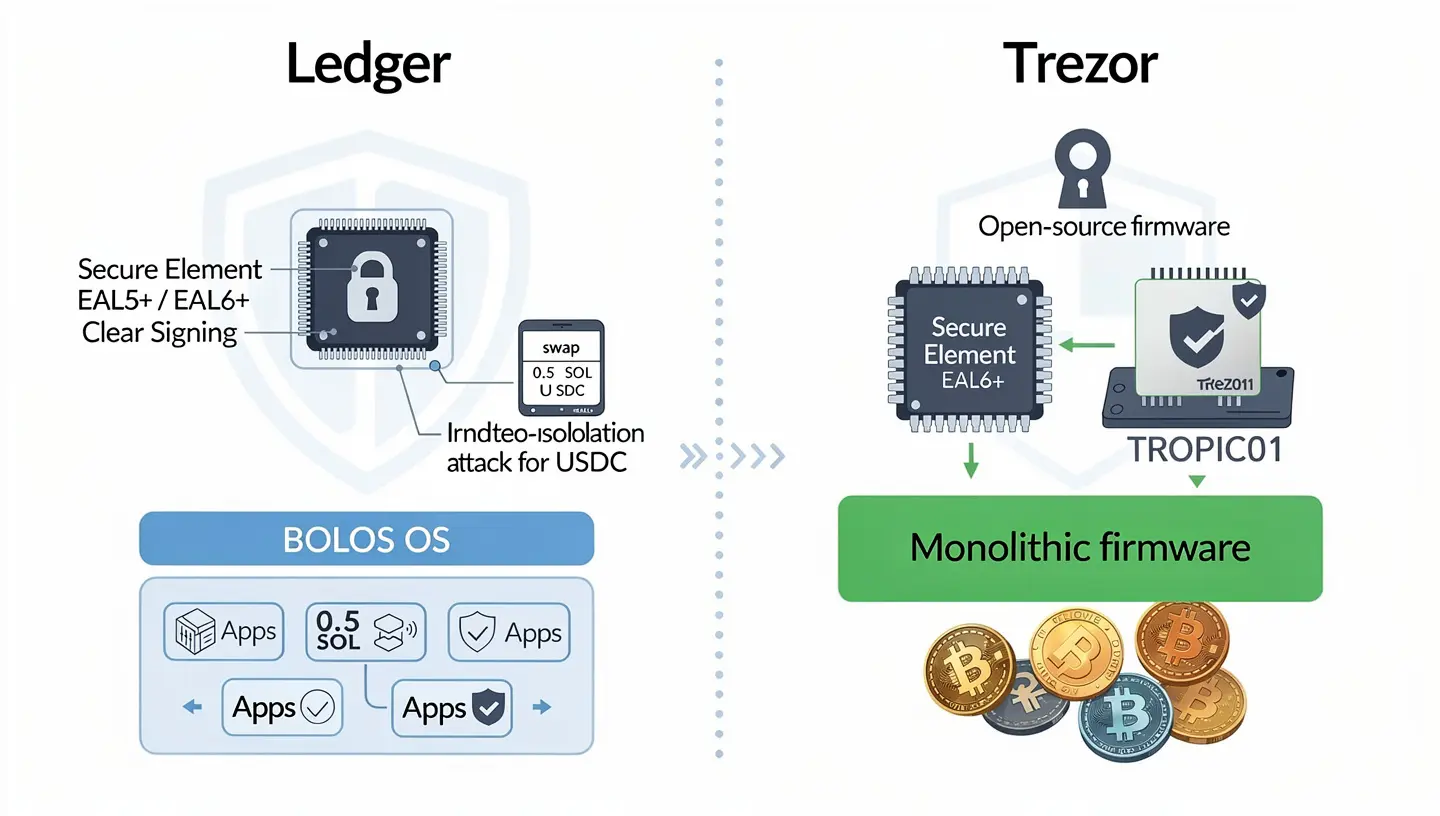
Ledger’s Secure Element and Clear Signing
Ledger devices run on a Secure Element chip, the same category of chip used in passports and credit cards. On Ledger signers, that chip does more than store the key. It reads the transaction data, builds what shows up on the screen, and signs the transaction, all inside one protected environment. This is what powers Clear Signing, a feature that turns raw transaction data into a plain description such as swap 0.5 SOL for USDC, instead of a wall of hexadecimal code. Ledger’s higher end models carry EAL6+ certification under the Common Criteria framework, with the Nano X sitting at EAL5+. That certification means the chip has gone through independent lab testing against physical attack methods such as voltage glitching, side channel analysis, and fault injection, and is rated for how well it resists each one.
Trezor’s open-source approach and Secure Element
Trezor’s pitch has always centered on transparency. The firmware is fully open source, meaning anyone can review the code that runs on the device. For years that came at a cost: the original Model One and Model T had no Secure Element at all, relying only on a general purpose microcontroller. The Safe series fixed that gap. Safe 3 and Safe 5 now ship with EAL6+ certified Secure Elements, and the Safe 7 goes a step further with a chip called TROPIC01, marketed as the first auditable Secure Element available to consumers, paired with a second EAL6+ chip for extra protection. That combination closes a criticism that followed Trezor for a long time.
Firmware design and isolation
Ledger runs a custom operating system called BOLOS, which isolates each cryptocurrency app from the others. If a flaw turns up in one app, it cannot automatically spread to the rest of the device. Trezor runs what is usually described as monolithic firmware, meaning the wallet software, coin support, and key management all execute inside one shared environment on the main chip. That design means new coins can work right after a firmware update without installing separate apps, but it gives the device less internal separation than Ledger’s app based structure.
Which is safer for storing SOL?
For the simple act of holding SOL offline, both approaches work. Ledger leans on hardware isolation and a closed but heavily tested chip. Trezor leans on a fully auditable codebase plus a Secure Element on its newer models. Neither has had a confirmed remote extraction of private keys from a shipped device. The real differences for Solana holders show up once you go past basic storage, which is where the next sections matter more than the chip inside the device.
Have Ledger or Trezor ever been hacked?
This question comes up constantly, and the honest answer requires separating two very different things: a breach of customer data versus an actual extraction of private keys from the device.
Ledger’s 2020 data breach
In July 2020, attackers broke into Ledger’s e-commerce database and exposed personal information for roughly 270,000 customers, including names, emails, phone numbers, and physical addresses. No private keys or funds were taken in that breach, since it hit Ledger’s marketing systems rather than the devices themselves. The fallout was still real. Affected customers received a wave of phishing emails and scam attempts for months afterward, since attackers now had a list of confirmed Ledger owners to target.
Physical attacks on older Trezor models
Security researchers, including Ledger’s own Donjon team, have demonstrated physical extraction attacks against older Trezor hardware using methods such as voltage glitching, which requires direct physical access to the device and specialized lab equipment. Trezor corrected the issues that were responsibly disclosed through firmware updates released in 2019. No Trezor user has had funds remotely stolen through these vulnerabilities, since they require the device itself in hand, not a remote connection.
What this means for your SOL
Neither brand has a case of someone remotely draining a properly secured device. The Ledger breach was about data exposure that fed phishing campaigns, not a flaw in how SOL or any other asset is stored on the device. The Trezor vulnerabilities required a lab and physical possession of an older model, and they were patched. The bigger ongoing risk for SOL holders on either device remains the same: phishing sites, fake support requests, and entering a seed phrase somewhere it should never go.
Does Ledger or Trezor support Solana natively?
Native support is not the same thing as listing SOL on a webpage. Here is what each brand actually built.
Solana support on Ledger
Ledger has a dedicated Solana app available through Ledger Live, and it works across the full current lineup, from the Nano S Plus up to the Stax. SPL tokens, the Solana equivalent of ERC-20 tokens, show up directly underneath your Solana account once the app is installed and updated. Ledger also publishes a Solana Signer Kit for developers, which is a sign of how mature this integration actually is compared to a brand that just added a coin to a supported list.
Solana support on Trezor
Trezor added SOL and SPL token support in December 2023, and it now covers the Model T, Safe 3, Safe 5, and Safe 7. The older Model One never received Solana support and likely never will. Buying SOL through Trezor Suite works through the Trade tab using Invity as the provider, and receiving SOL follows the same flow as any other asset: open Trezor Suite, activate the account, and verify the address on the device screen before sharing it.
Why derivation paths matter for Solana
Solana wallets use the derivation path m/44’/501’/0′, with 501 being Solana’s assigned coin type. Ledger supports this path natively across its Solana app and signer tools. Trezor’s relationship with this path has been rockier. There is an open issue on Trezor’s own GitHub repository where a user asked the team to add support for discovering Ledger’s Solana derivation path during account setup, a small but telling sign that Solana was never the network Trezor built around first.
Native staking: where Ledger pulls ahead
If staking SOL directly from your hardware wallet matters to you, this section settles it quickly. Ledger Live supports native staking for Solana. You delegate to a validator from inside the app, and the process looks similar to staking any other supported asset on Ledger. For a full walkthrough of how delegation and validator selection works, our guide on how to stake Solana covers the steps in detail, whether you are using a software wallet or a hardware wallet alongside it.
Trezor cannot say the same thing yet. Trezor’s own documentation states plainly that staking is not available in Trezor Suite for Solana, with a note that it may arrive in a future release. For now, anyone who wants to stake SOL while keeping a Trezor as the signer has to route through a third party wallet rather than staking straight from Trezor Suite.
Connecting Trezor or Ledger to Solana dApps
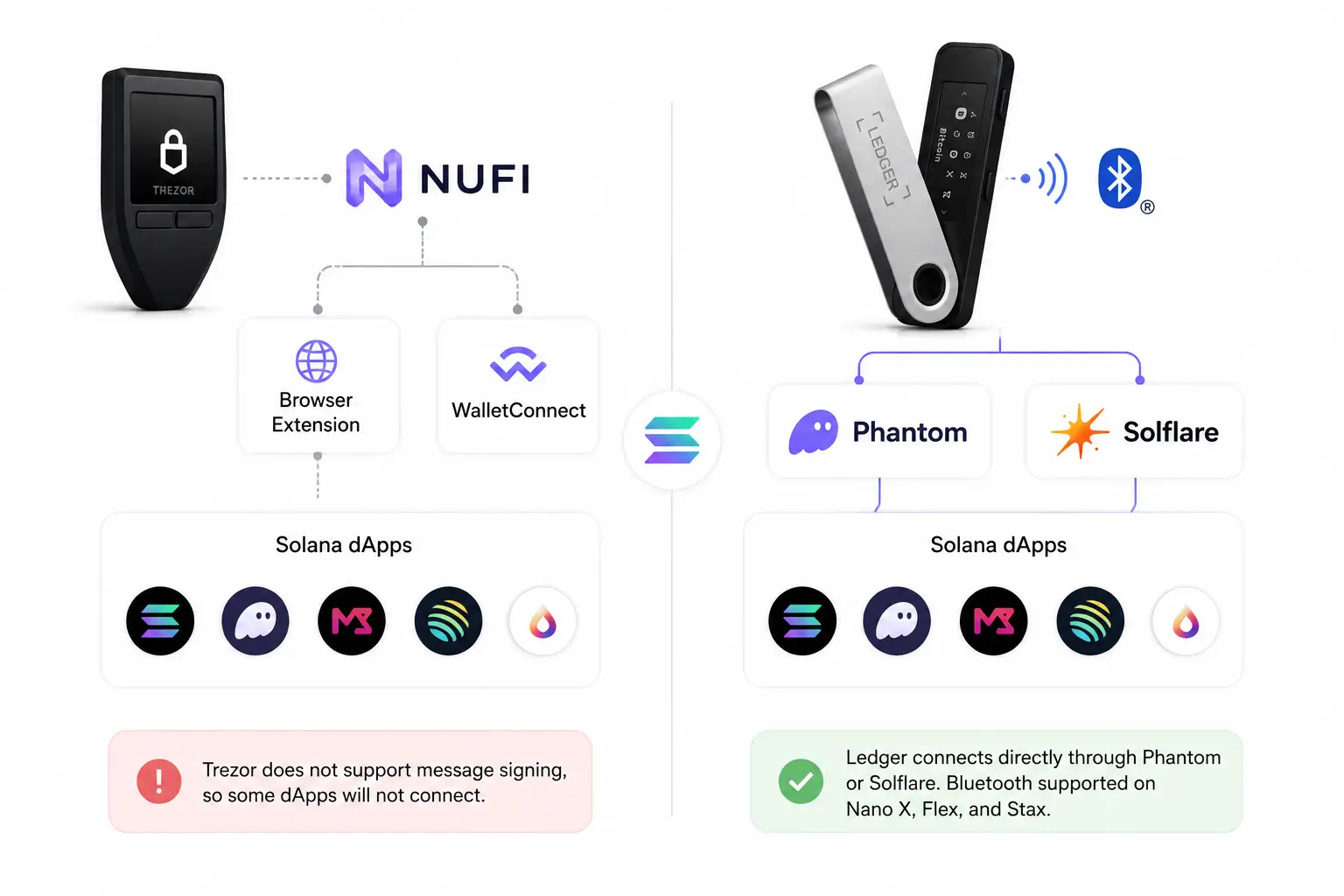
This is the part most comparisons skip, and it matters more than people expect once you try to actually use SOL beyond holding it.
Trezor and the message signing limitation
Many Solana dApps, including NFT marketplaces and DeFi platforms, require message signing to confirm wallet ownership before you can connect. Trezor does not currently support this. In practice, that means certain dApps will simply refuse to connect to a Trezor device, regardless of which wallet app you are routing through.
Using NuFi to bridge Trezor to Solana
NuFi exists to close part of that gap. Since Trezor has no built in Solana dApp connector, NuFi pairs with your Trezor’s Solana accounts and lets you connect to dApps either through its browser extension or through WalletConnect. NuFi covers most dApps that accept its wallet connection, but the message signing limitation still applies underneath, so anything requiring a signature for login will still be out of reach.
Ledger connects directly through Phantom and Solflare
Ledger skips the extra step entirely. You can pair a Ledger directly with Phantom or Solflare without a third app standing in between. On models with Bluetooth, including the Nano X, Flex, and Stax, that pairing works wirelessly from a phone, which makes day to day use noticeably smoother than the Trezor plus NuFi route.
Managing Solana NFTs on each wallet
NFTs on Solana are common enough that this is worth its own section rather than a side note. Ledger Live shows NFTs in a gallery style layout, with links out to marketplaces such as Magic Eden, and on the Stax and Flex models you can even display NFT artwork on the device’s own lock screen. Trezor Suite has no built in NFT interface at all. Your NFTs remain just as secure on a Trezor as on a Ledger, since the underlying keys are protected the same way, but viewing the artwork, checking collection details, or managing a large NFT portfolio means connecting out to a third party tool rather than doing it inside Trezor’s own software.
How to set up Ledger or Trezor with a Solana wallet
Here is what the actual setup looks like for each brand, since this is the part most general comparisons leave out entirely.
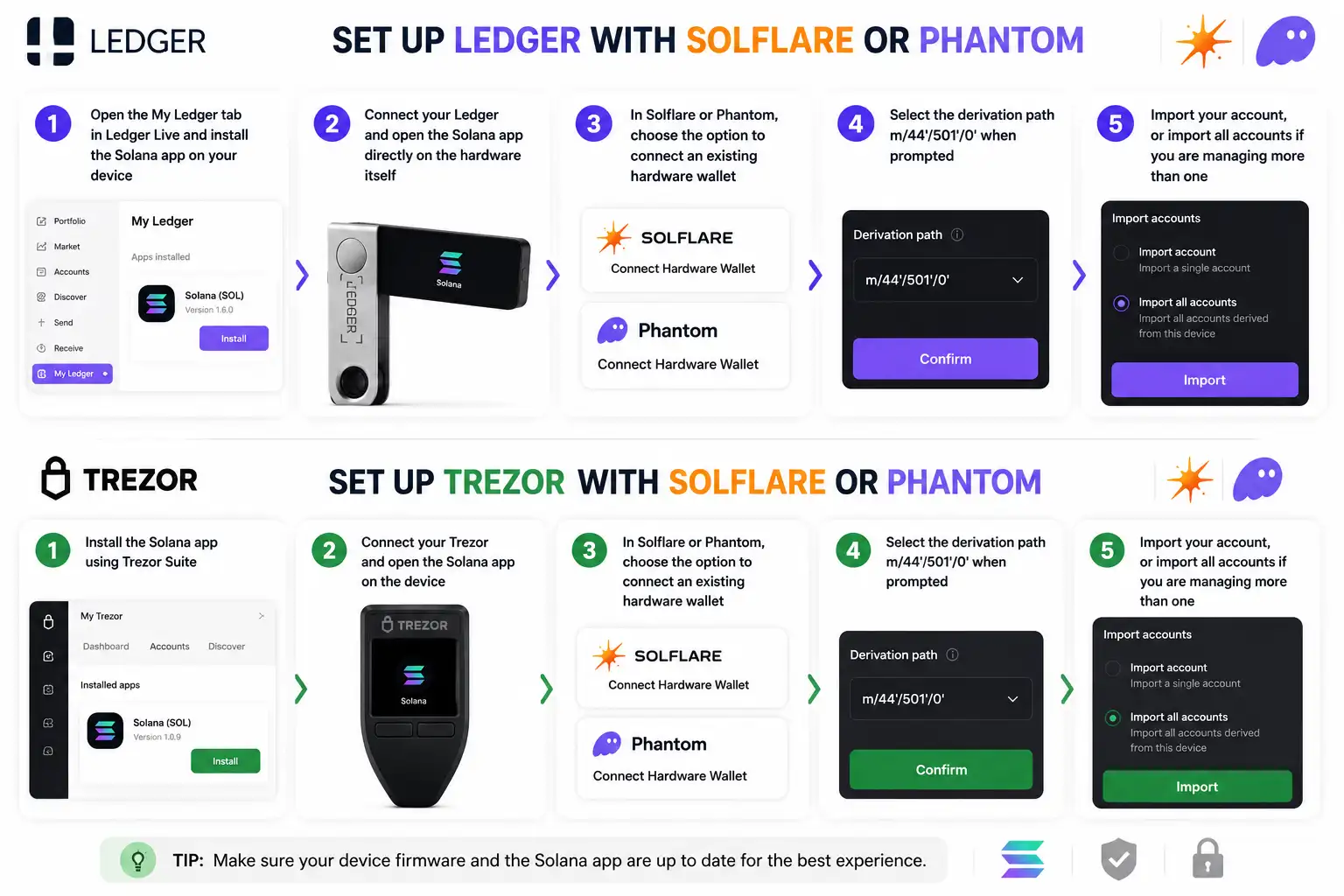
Setting up Ledger with Solflare or Phantom
- Open the My Ledger tab in Ledger Live and install the Solana app on your device
- Connect your Ledger and open the Solana app directly on the hardware itself
- In Solflare or Phantom, choose the option to connect an existing hardware wallet
- Select the derivation path m/44’/501’/0′ when prompted
- Import your account, or import all accounts if you are managing more than one
If you have not set up either software wallet yet, our guide on how to set up Phantom wallet covers the full process before you get to the hardware pairing step.
Enabling blind signing for SPL tokens
Some SPL token transactions, particularly through third party apps, require blind signing to be turned on. On the Ledger device, open the Solana app settings and enable Allow Blind Signing. Without this step, certain SPL token transfers will be rejected by the device even if everything else is set up correctly.
Setting up Trezor for Solana through Trezor Suite or NuFi
Open Trezor Suite, activate the Solana account if you have not already, and use Receive to generate an address, verifying it on the device screen before sending funds to it. For dApp access beyond basic sending and receiving, you will need to set up NuFi separately and pair your Trezor’s Solana accounts there first. If you decide a software wallet might be easier to manage day to day alongside your hardware device, our guide on how to create a Solana wallet walks through the options.
Recovery and backup options
Losing access to your device should never mean losing access to your SOL, and recovery is where the two brands diverge the most.
BIP-39 vs SLIP-39
Ledger uses the standard BIP-39 recovery phrase, typically 24 words, which restores access across any wallet that follows the same standard, Solana wallets included. Trezor’s Safe series defaults to SLIP-39, also known as Shamir Backup, which splits your recovery information into multiple shares. You set a threshold, for example three out of five shares needed to restore the wallet, which removes the risk of a single lost backup locking you out for good. The trade off is compatibility. SLIP-39 is supported by far fewer wallets than BIP-39, so it works best if you are staying within Trezor’s own ecosystem of tools. Whichever standard you end up using, our breakdown of the seed phrase on Solana explains why this backup matters more than almost anything else tied to your wallet.
Passphrase protection on both devices
Both brands support an optional passphrase, sometimes called the 25th word, which adds an extra layer on top of the standard recovery phrase. On Ledger, you can enter the passphrase on the device itself. On Trezor, you can enter it either on the device or through the connected computer, depending on the model. A passphrase creates what is effectively a hidden wallet, since the same seed phrase combined with a different passphrase produces a completely different set of accounts, including different Solana addresses.
Ledger Recovery Key and Ledger Recover
Ledger offers two optional backup services beyond the standard paper recovery sheet. Ledger Recovery Key is a PIN protected physical card with its own Secure Element, included with newer touchscreen devices, that can restore access by tapping it against the device. Ledger Recover is a separate paid subscription that encrypts your seed, splits it into three fragments, and sends each fragment to a different custodian, with recovery requiring identity verification. This service caused real backlash when it was announced in 2023, since critics argued it works against the entire point of a hardware wallet, which is that the seed phrase should never leave the device or touch a third party at all. Ledger Recover remains entirely optional, and most users never turn it on, but the controversy is part of the brand’s history and worth knowing about before you decide whether to use it.
Supported coins beyond Solana
Most people holding SOL are not holding only SOL, so it is worth knowing how each brand handles the rest of a typical portfolio. Ledger supports more than 15,000 coins and tokens natively through Ledger Live. Trezor lists more than 9,000 supported assets, though a meaningful portion of those require a third party wallet such as MetaMask for full functionality rather than working directly inside Trezor Suite. If Ethereum or other EVM chains make up part of your holdings alongside Solana, our piece on whether MetaMask supports Solana is worth a look before you decide how many wallets you actually need running at once.
Models and pricing
Not every model in either lineup supports Solana, so the comparison below only covers the devices that actually do.
| Model | Price | Screen | Connectivity | Secure Element |
|---|---|---|---|---|
| Ledger Nano S Plus | $79 | Small OLED | USB-C | EAL5+ |
| Ledger Nano X | $149 | Small OLED | USB-C, Bluetooth | EAL5+ |
| Ledger Flex | $249 | 2.84 inch E Ink touch | USB-C, Bluetooth, NFC | EAL6+ |
| Ledger Stax | $399 | 3.7 inch curved E Ink touch | USB-C, Bluetooth, NFC | EAL6+ |
| Trezor Safe 3 | $79 | Small OLED | USB-C | EAL6+ |
| Trezor Safe 5 | $169 | 1.54 inch color touch | USB-C | EAL6+ |
| Trezor Safe 7 | $279 | 2.5 inch color touch | USB-C, Bluetooth | Dual chip, EAL6+ |
Mobile app and everyday use
Ledger Live runs fully on iOS and Android, and Bluetooth on the Nano X, Flex, and Stax means you can manage your Solana holdings from a phone without ever plugging in a cable. Trezor Suite Lite for Android exists, but it is watch only, meaning you can check balances and verify an address, not send a transaction from your phone, and there is no iOS version at all outside of the Safe 7’s limited Bluetooth use. For anyone who wants to check on SOL holdings or move funds while away from a desktop, Ledger’s mobile setup covers more ground.
Buying SOL directly through Ledger or Trezor
Both apps let you buy SOL without leaving the wallet interface, though the actual purchase always routes through a partner provider rather than the hardware itself. Ledger Live offers this through its buy partners, and Trezor Suite handles it through the Trade tab using Invity. Either way, the hardware wallet’s job starts once the SOL lands in your account, not during the purchase itself. If you are weighing where SOL should sit for the long run once it is in your possession, our guide on how to store SOL long term covers the bigger picture beyond just picking a device.
Customer support and resources
Ledger runs its Academy as a knowledge base, with support funneled through a chat widget and ticket system on support.ledger.com rather than a public inbox. Trezor maintains an extensive Wiki and a community forum, and the company lists a support email through SatoshiLabs for direct contact, alongside ticket based help on trezor.io. Both brands have active Reddit communities where questions often get answered faster than through official channels. One rule applies to both: no legitimate support agent from either company will ever ask for your seed phrase or recovery words. If a message claiming to be support asks for that, it is a scam, and our guide on Solana scams covers more of the patterns to watch for.
Pros and cons for Solana users
Why choose Ledger for Solana
- Native staking available directly inside Ledger Live
- Direct pairing with Phantom and Solflare, no extra app required
- Full dApp and message signing support
- NFT gallery view built into Ledger Live
- Stronger mobile experience with Bluetooth on several models
Why choose Trezor for Solana
- Fully open source firmware for anyone who wants to audit the code
- SLIP-39 Shamir Backup as a more flexible recovery option
- Lower entry price on the Safe 3
- No Ledger Recover style cloud backup controversy attached to the brand
- A reasonable pick if Solana is a small slice of a much larger portfolio
For a broader look at where each Solana wallet option stands today, not just the hardware layer, our roundup of the best Solana wallets covers the software side of this decision too.
Ledger vs Trezor for Solana: final verdict
For anyone whose main reason for buying a hardware wallet is protecting SOL specifically, Ledger is the more complete option right now. Native staking, direct Phantom and Solflare pairing, NFT support, and full dApp access close gaps that Trezor has not filled yet. Trezor still makes sense if open source transparency matters more to you than convenience, if you would rather avoid any brand tied to a cloud backup controversy, or if Solana is just one piece of a portfolio spread across many chains where Trezor’s broader open approach already fits your workflow. Either device will keep your SOL safer than leaving it on an exchange. The difference shows up the moment you try to do more than just hold it.
Frequently asked questions about Ledger and Trezor for Solana
Can I stake SOL directly on Trezor?
Not yet. Trezor’s own documentation confirms that native SOL staking is not currently available in Trezor Suite. Staking SOL while using a Trezor as your signer currently requires routing through a separate platform rather than staking inside Trezor’s own app.
Does Trezor support Solana NFTs and dApps?
Partially. Trezor does not support message signing, which blocks some dApps that require a signature to verify wallet ownership, and Trezor Suite has no built in NFT interface at all. A third party app such as NuFi can bridge many dApp connections, but the underlying message signing limitation still applies to anything that depends on it.
What derivation path does Solana use on Ledger?
Solana uses the derivation path m/44’/501’/0′, with 501 representing Solana’s coin type. Ledger supports this path natively through its Solana app, and it is the path you will select when connecting a Ledger to Phantom or Solflare.
Can I use Phantom or Solflare with both Ledger and Trezor?
Phantom and Solflare both pair directly with Ledger. Trezor does not connect directly to either app in the same way, since Trezor’s Solana support runs through Trezor Suite or a bridge app like NuFi rather than a native connection to Phantom or Solflare.
Which Ledger and Trezor models support Solana?
On the Ledger side, every current model supports Solana, including the Nano S Plus, Nano X, Nano Gen5, Flex, and Stax. On the Trezor side, the Model T, Safe 3, Safe 5, and Safe 7 support Solana, while the older Model One does not and never received the update.
Is Ledger Recover safe to use for a Solana wallet?
Ledger Recover is optional and encrypts your seed before splitting it across three separate custodians, with identity verification required to restore it. The fragments are not useful on their own, but the service does introduce third parties and KYC into a process that otherwise never leaves your device, which is why many security focused users choose to leave it turned off entirely, including those holding SOL.
Have Ledger or Trezor devices ever been remotely hacked?
No confirmed case exists of either brand having private keys remotely extracted from a properly secured device. Ledger’s 2020 incident exposed customer contact data, not keys or funds. Vulnerabilities found on older Trezor models required physical possession of the device and lab equipment, and were patched through firmware updates.
References: Trezor: Solana, what it is and how it works with Trezor · Ledger Developer Portal: Solana Signer Kit