You can create a Solana token for free only on devnet, the test network of Solana. On mainnet the token costs a few cents in SOL if you do it yourself, and between 0.1 and 0.5 SOL if you use a no-code creator that charges its own fee. Most pages that promise a free Solana token mention that fee only when you reach the payment button.
This guide separates the real costs from the marketing. You will see what devnet gives you, what the network and rent charge on mainnet, how four different methods compare, and what to do once the token exists. Prices come from the tool pages as they looked in October 2026 and they change often, so read the summary screen in your wallet before you sign anything.
Can you really create a Solana token for free?
Short answer: yes on devnet, no on mainnet, with one exception. Devnet is a test network. The SOL you get from the faucet has no value, and tokens minted there cannot be traded or listed anywhere. It is a good place to practice every step, but a devnet token is not a real asset.
On mainnet every token needs a mint account, and every account on Solana has to hold a small rent deposit in SOL. You also pay a transaction fee. Doing it yourself through the command line keeps the total far below one dollar. No-code Solana token creator sites add a platform fee on top, and that is where the “for free” claim usually falls apart. The exception is Pump.fun, which asks for almost nothing at creation and takes about 1% of every trade instead.
| Item | Devnet | Mainnet |
|---|---|---|
| SOL for fees | Free from the faucet | Has to be bought |
| Token mint through the CLI | Free | A few cents in SOL |
| Token mint through a no-code creator | Free on some sites | 0.1 to 0.5 SOL |
| Can people trade it | No | Yes, after you add liquidity |
| Real value | None | Set by the market |
If you hold no SOL yet, the guide on how to buy Solana shows the usual ways to get it, and 0.1 SOL is enough to follow the command line method from start to finish.
What is a Solana token?
A Solana token is a fungible asset that lives on the Solana blockchain and follows the SPL token standard, short for Solana Program Library. SOL is the native coin that pays for fees. A token is something created on top of the network by a program that already exists. Stablecoins, community coins and every meme coin you have seen on a DEX are SPL tokens.
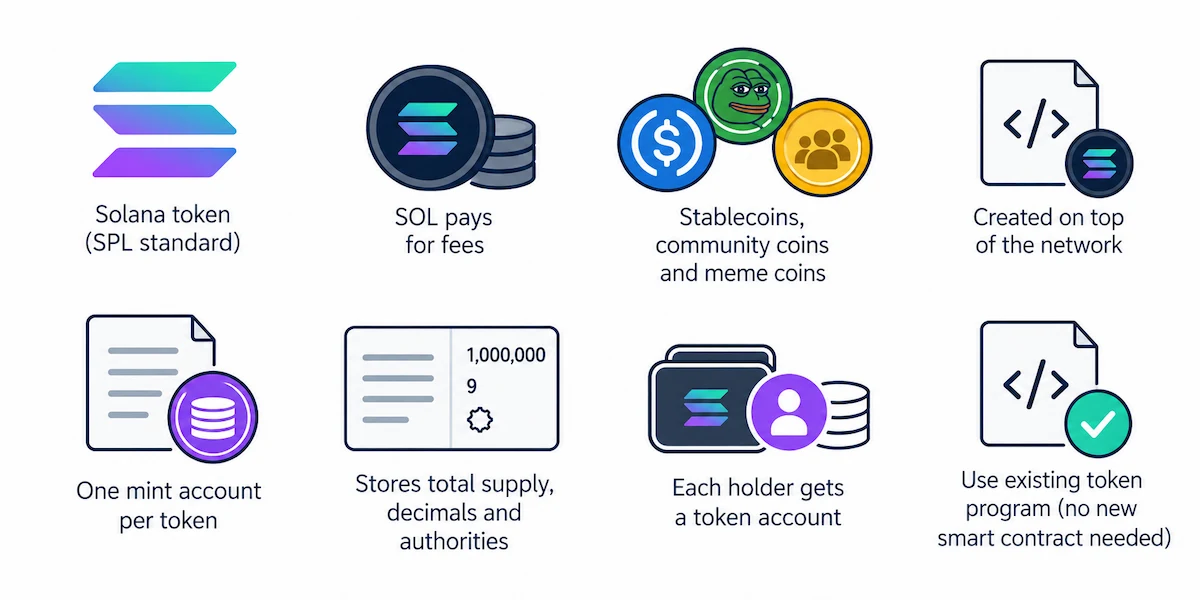
Each token has one mint account. It stores the total supply, the number of decimals and the authorities that control the token. Every holder gets a token account, normally an associated token account created for that wallet and that token. Because the token program is already deployed and audited by the network, you do not have to write or publish your own smart contract to make a token. You only send an instruction that tells the program to create a new mint.
What you can do with an SPL token
Most people start with a meme coin or a community token, but the same standard covers other uses too. A project can issue points for a loyalty program, an in-game currency, a vote token for a small group or a test asset for developers who need something to try an app with. A Solana token gives nothing by itself, so its use comes from what people can do with it and not from the fact that it exists.
Why launch a token on Solana?
Fees are the first reason. A normal transaction costs a fraction of a cent, and Bitbond puts a typical Solana transaction under 0.01 dollars, so creating, sending and testing a Solana token does not turn into a budget problem. Confirmation takes a few seconds, and Phantom, Solflare and Backpack show SPL tokens without extra setup. Every large DEX on the network supports SPL token pairs.
Solana also has weak points that a new token owner should know about. Meme coin launches are crowded, so a new token competes for attention with hundreds of others made the same day, and bots trade new pools within seconds. Account rent adds small deposits for every holder who receives your token, and the network has had outages in the past. To see why transactions are cheap and quick, read how Solana works, since the design explains both the strengths and the trade-offs.
How much does it cost to create a Solana token?
The cost has four parts: the network fee, the rent for the accounts, the storage for the logo and name, and the fee of any tool you use. The first two are fixed by the network and look the same for everyone, no matter which website or command you use to send the transaction. The last two depend on your choices, and that is where the price of a token can jump from a few cents to more than half a SOL. The table at the end of this section puts every item side by side so you can add them up for your own plan.
Network fee and account rent
A basic transaction costs 5,000 lamports, which is 0.000005 SOL, as explained in the article about Solana transaction fees. The mint account needs a rent-exempt deposit of about 0.00145 SOL, and the token account that holds your supply needs about 0.002 SOL. Those deposits stay in the accounts and are not a fee paid to anyone. Counting everything, a plain SPL token made through the CLI costs less than 0.01 SOL.
Metadata and logo storage
The mint account does not store a name, a symbol or a picture. That information sits in a separate metadata account, created through the Metaplex Token Metadata program or through the metadata extension of Token-2022. The image and the description file are usually uploaded to IPFS or Arweave. Backpack Learn estimates 0.01 to 0.05 SOL for this part, and several tools include it in their price.
What no-code token creators charge
No-code sites handle the transaction for you and take a fee for it. At the time of writing, SolTokenCreator and Smithii list 0.5 SOL as the base price, CoinFactory and SolTokenLaunch start at 0.1 SOL, and TokenToolbox shows 0.15 SOL. Revoking the mint, freeze or update authority is often a separate add-on of around 0.1 SOL each. A token with both main authorities revoked can land at 0.3 to 0.7 SOL depending on the site. None of these pages call the token free once you read the price list.
Cost of a liquidity pool
A Solana token nobody can swap is only a number in a wallet. To make it tradable you add a liquidity pool. A Raydium CPMM pool costs about 0.2 SOL in fees and rent, the older AMM v4 route with an OpenBook market ID costs closer to 1 SOL, and Smithii counts at least 3.3 SOL for the traditional route including everything. Orca has a token tool with a Splash Pool option, and it shows the estimated cost in the preview step. The liquidity you put in the pool is a separate amount and it is your own money.
| Cost item | Approximate amount |
|---|---|
| Transaction fee | 0.000005 SOL |
| Mint account rent | about 0.00145 SOL |
| Token account rent | about 0.002 SOL |
| Metadata and logo storage | 0.01 to 0.05 SOL |
| No-code creator fee | 0.1 to 0.5 SOL |
| Revoke one authority on a creator site | about 0.1 SOL |
| Raydium CPMM pool | about 0.2 SOL |
| Raydium AMM v4 pool with market ID | about 1 SOL |
What you need before you start
 A Solana wallet
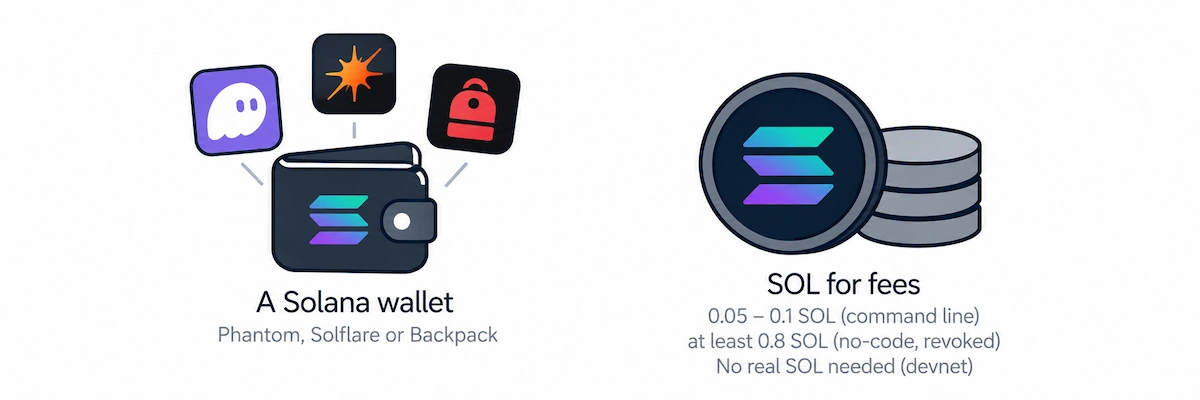
You need a wallet that can sign transactions and hold the mint authority. Phantom, Solflare and Backpack all work with every tool in this guide. If you have never made one, the walkthrough on how to create a Solana wallet takes about five minutes. Write the recovery phrase on paper and keep it away from screenshots and cloud notes.
SOL for fees
For the command line route 0.05 to 0.1 SOL is plenty. For a no-code creator keep at least 0.8 SOL, which is the minimum SolTokenCreator recommends for a token with revoked authorities. For devnet you need no real SOL at all.
Token details to decide first
Settle these before you open any tool, because some of them cannot be changed later:
- Name and symbol, for example “Example Token” and EXMP.
- Total supply and the number of decimals.
- A square logo, usually PNG, and a short description.
- Website and social links, if the token has a project behind it.
- Which authorities you will keep and which you will revoke.
Token name, symbol, supply and decimals explained
The name is the long label wallets show, and the symbol is the short ticker of three to six letters. Nothing on Solana stops two tokens from using the same name or symbol, so people check the mint address, not the name. Copy the address of your token and keep it somewhere safe, because it is the only reliable way to prove which token is yours.
Decimals decide how finely a token can be split. SOL uses 9 decimals, and the CLI uses 9 by default. Many tokens pick 6, as stablecoins do. The number of decimals is fixed when the mint is created. Supply is the number of tokens you mint, and with a mint authority in place you can mint more later. Once you revoke the mint authority, the supply is locked for good.
The logo and the description live in the metadata. They can be changed only while you hold the update authority, which is the reason buyers look at who controls it.
How many tokens should you create?
There is no correct number, and the amount on its own says nothing about value. What counts is the share of the supply that people can actually buy, and the price per token follows from the liquidity you add. Many meme coins mint 1 billion tokens because the figures look simple in a wallet. SolTokenCreator and Bitbond both give this decision its own section, and they agree that you should think about purpose and audience before you pick a number.
Plan the split before you mint. A common structure puts the biggest part into the liquidity pool, a share into airdrops and community rewards, a smaller share for the team with a lock, and a reserve for listings and future costs. The numbers below are an example and not a rule.
| Share of supply | Example | Purpose |
|---|---|---|
| Liquidity pool | 50% | Lets people buy and sell |
| Community and airdrops | 20% | Rewards for early holders |
| Team | 15% | Locked or released slowly |
| Reserve | 10% | Listings and future costs |
| Marketing | 5% | Campaigns and partnerships |
A team share without any lock is the first thing buyers check. If a large part sits in one wallet and nothing stops you from selling it, holders treat it as a warning sign. Say clearly how many tokens you keep and publish the wallet address.
Mint, freeze and update authority
Three authorities control a Solana token, and every serious buyer checks them on Solscan before touching a new coin.
The mint authority can create more tokens. As long as it exists, the supply can grow, and holders can be diluted at any time. The freeze authority can freeze a token account so the holder cannot move the tokens. A Solana token with an active freeze authority cannot be added to some pools, and Raydium will not accept it in several pool types. The update authority can change the name, the logo and the links stored in the metadata.
To revoke an authority means to set it to nothing, and that step cannot be undone. Revoke the mint authority only after you have minted the full supply you want, and revoke the freeze authority before you add liquidity. Creator sites charge around 0.1 SOL for each revoke, while the CLI does it for the price of a normal transaction. A Solana token with all three authorities revoked is called immutable, and that is what most communities expect from a meme coin.
SPL token or Token-2022?
Solana has two token programs. The original SPL token program is the standard one, supported by every wallet, DEX and tracker. Token-2022, also called Token Extensions, adds optional features such as a transfer fee, a built-in metadata field, a non-transferable setting and confidential transfers.
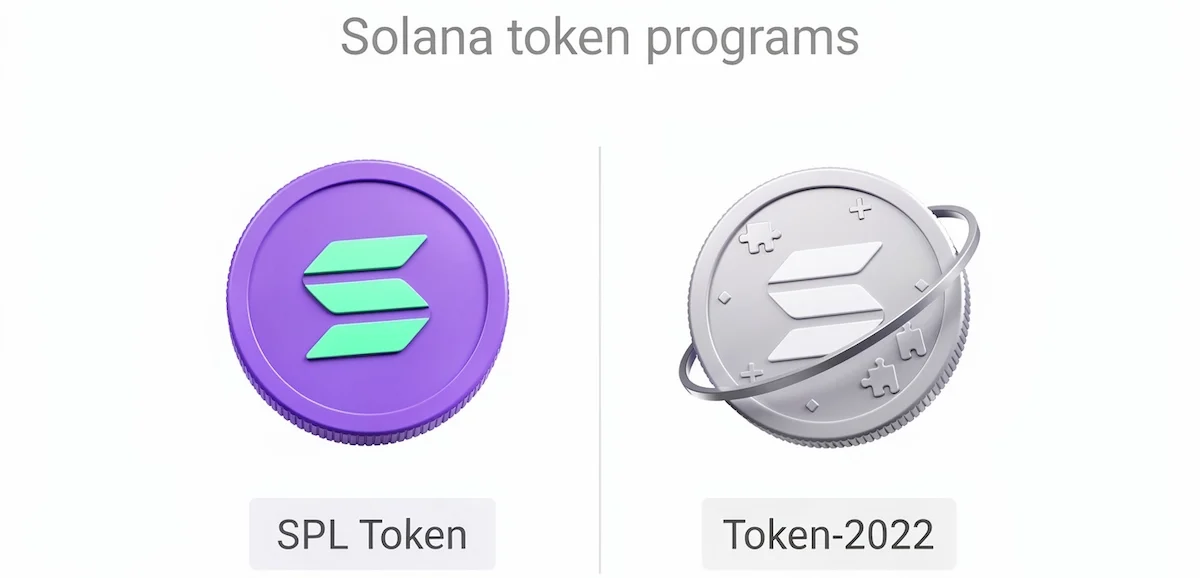
For most projects the plain SPL token is the safer pick, because support is complete. Choose Token-2022 only when you need one of its extensions, for example a transfer tax or on-chain metadata without Metaplex. Be aware that some DEXs and tools still handle Token-2022 tokens with limits, so test the full path on devnet first. Smithii and Bitbond both warn that a token with a tax can be rejected by some pools.
How a Token-2022 transfer fee works
The transfer fee extension takes a set percentage of every transfer and keeps it in the receiving token account until the fee authority collects it. This is what people call a tax token. The percentage and the cap are set when the mint is created. A fee on every transfer makes many buyers suspicious, it complicates pools and airdrops, and some wallets and DEXs may not handle it well. Creator sites charge more for it, and SolTokenLaunch and SolTokenCreator list a tax token at 0.5 SOL.
Method 1: Create a Solana token for free on devnet
This is the only way to create a Solana token for free without any trick. You need the Solana CLI and the spl-token tool installed, or you can use Solana Playground in the browser, which skips the installation. The commands match the official token quickstart from Solana.
Step 1: Get free devnet SOL
Open the Solana faucet, paste your wallet address and request test SOL on devnet. From the terminal you can also run solana airdrop 2. The faucet limits how much you can ask for in a short time, so if a request fails, wait a bit and try again.
Step 2: Point the CLI or your wallet at devnet
In the terminal run solana config set –url devnet and then solana balance to confirm the test SOL arrived. In Phantom, open the settings, go to Developer Settings and switch on Testnet Mode, then pick Solana Devnet. Everything you do now happens on the test network.
Step 3: Create the token mint
Run spl-token create-token. The command prints the address of your new mint and the signature of the transaction. For a Token-2022 mint with built-in metadata, add the program id of Token-2022 and the –enable-metadata flag, then run spl-token initialize-metadata with the mint address, the name, the symbol and the link to your metadata file.
Step 4: Create a token account and mint supply
Run spl-token create-account followed by the mint address, then spl-token mint with the mint address and an amount, for example 100. Check the result with spl-token supply and spl-token balance.
Step 5: Send some of the tokens to another wallet
Run spl-token transfer with the mint address, the amount and the address of the receiving wallet, and add the –fund-recipient flag so the command creates the token account for the receiver if it does not exist yet. On mainnet the sender pays the rent of about 0.002 SOL for that new account, which is why airdrops to many wallets add up. Open the receiving wallet on devnet and the tokens should appear after a few seconds.
Step 6: Verify on Solana Explorer and practice the rest
Paste the mint address in Solana Explorer and set the cluster to devnet. You will see the supply, the decimals and the authorities. Use the same token to practice revoking the mint authority with spl-token authorize and the –disable option, because on devnet a mistake costs nothing. When you are happy with the flow, repeat it on mainnet with real SOL.
Method 2: Create a Solana token without code on mainnet
A no-code token creator is a website that builds the transaction for you. It is the fastest way to get a real Solana token with a logo, and it is not free. The steps look almost the same on SolTokenCreator, Smithii, Bitbond Token Tool, Orca and SoulMinter, so the list below applies to all of them.
Step 1: Connect your wallet
Open the creator site and click connect. If you use Phantom for the first time, the guide on how to set up a Phantom wallet covers the installation and the backup. Make sure the address in the address bar belongs to the official site, because fake copies of these tools exist.
Step 2: Enter the name, symbol, supply and decimals
Fill in the details you decided on earlier. Most sites show the total cost on the same screen and update it when you switch an option on.
Step 3: Upload the logo and add a description
Add the image and the text. The site uploads them to IPFS or Arweave and links them in the metadata. Social links are often a paid add-on of 0.1 SOL, although you can add them later on some platforms if you keep the update authority.
Step 4: Decide on authorities and optional features
Here you choose which authorities to revoke. Each revoke can raise the bill by about 0.1 SOL. Skip the extras you do not understand, such as transfer tax, because every extra feature is something a buyer has to trust.
Step 5: Review the total cost and sign
Read the line with the total in SOL and the wallet pop-up before you confirm. Creation usually takes a few seconds, and the whole flow takes about five minutes. If the transaction fails, you should see the error and your SOL should stay in the wallet, but check the balance before trying again.
Step 6: Verify the token on Solscan
Paste the mint address in Solscan and look at the supply, the decimals, the metadata and the three authorities. Save the mint address in a note. You will need it for every pool, listing and airdrop that follows.
Optional: choose a custom mint address
Some tools let you pick a custom mint address, often called a vanity address, that starts or ends with letters you choose. The Orca token tool has a randomize button for the address, and SoulMinter lists a custom mint address among its extra options. The address is only cosmetic and does not change how the token works, and it can add time or cost. Skip it unless the look of the address matters to your project.
What the extra options do and what they cost
Every creator site sells the base token and then lists add-ons. SoulMinter splits its tool into a Standard and a Pro tier, so read what each tier includes before you pay. The prices below are the ones shown on the sites at the time of writing and they differ from tool to tool.
| Option | What it does | Usual price |
|---|---|---|
| Social links | Adds website, X and Telegram to the metadata | about 0.1 SOL |
| Creator info | Shows the creator name in the metadata | about 0.1 SOL |
| Revoke mint authority | Locks the supply | about 0.1 SOL |
| Revoke freeze authority | Removes the power to freeze holders | about 0.1 SOL |
| Revoke update authority | Locks name, logo and links | about 0.1 SOL |
| Tax token | Adds a transfer fee through Token-2022 | about 0.5 SOL |
| Token and pool bundle | Creates the token and a liquidity pool in one flow | up to 0.6 SOL on one site |
What happens if the transaction fails
A failed transaction does not create the token, and the network fee for the attempt may still be charged, which is a fraction of a cent. The usual reasons are too little SOL, a congested network and an approval that expired. Check your balance and the explorer, wait a minute and try again, and do not press the button repeatedly because that can send duplicates. If a creator site took its platform fee but no token appeared, look at the transaction on Solscan before you contact support.
Does the creator site control your token?
It should not. A non-custodial creator builds the transaction in your browser, you sign it with your wallet, and the mint authority is set to your own wallet address. SolanaTracker and the Solana Token Creator site both describe this model. Confirm it on Solscan after creation, where the mint authority and the update authority should show your address, or none if you revoked them. If a site says it will hold the keys for you, or asks for a recovery phrase or a private key, leave.
Method 3: Launch a token on a launchpad
A launchpad creates the token and the market in one flow, so you skip the pool step. Alchemy and Backpack list several of them, and they differ in fees, in how the price is set and in what you can change afterwards.
Pump.fun
Pump.fun is a launchpad made for meme coins. You enter a name, a ticker, a picture and a description, sign one transaction, and the coin is live on a bonding curve. Creation costs close to nothing, and the platform earns a fee of about 1% on each trade. Competitors list the creation cost at around 0.02 SOL, and you can add an optional first buy of your own.
The coin trades from the first minute because the bonding curve acts as the market, so you do not build a pool yourself. When enough buyers fill the curve, the token moves to a regular DEX pool. The trade-off is control. You pick no custom decimals or supply, you cannot add features, and the tokens normally come with the mint and freeze authorities already removed, which you should confirm on Solscan. Smithii also points out that most tokens launched this way never go anywhere, so treat it as an experiment and not as a plan.
Raydium LaunchLab, Bonk.fun and Jupiter Studio
Alchemy names Raydium LaunchLab and Bonk.fun next to Pump.fun as no-code launchpads, and Backpack adds Jupiter Studio to its list. They work in a similar way, with a name, a ticker, an image and one signed transaction. Fees and curve rules differ from platform to platform and they change, so open the launch page and read the summary before you sign.
Launching straight into a pool
SolanaTracker offers routes without a bonding curve, a direct PumpSwap launch and a Meteora DAMM v2 pool. You set the starting liquidity yourself, so the market opens at the price you decide, and you pay the pool costs plus the tool fee. This route suits a project that wants a planned start, and it needs more SOL than a curve launch.
Method 4: Create a token with code
Developers can build the same token with TypeScript. The usual stack is the Metaplex Umi framework with the mpl-token-metadata package, the Solana web3 library, an RPC provider and an IPFS service such as Pinata. Alchemy has a step-by-step guide that goes from project setup to the explorer check. This route gives full control over metadata and authorities, and it needs Node.js, a funded wallet and a private key stored in an .env file. Never commit that file to a public repository.
Which method should you choose?
| Method | Cost | Control | Best for |
|---|---|---|---|
| Devnet through the CLI | Free | Full | Learning and testing |
| No-code creator on mainnet | 0.1 to 0.7 SOL | Full, with fees for extras | A real token with a logo |
| Launchpad such as Pump.fun | Close to zero, 1% trade fee | Limited | A quick meme coin |
| Code with Umi and Metaplex | A few cents plus storage | Full | Developers |
If you only want to learn, stay on devnet. If the token is meant for a community and you want a clean setup with the authorities revoked, the CLI or a no-code creator gives you more control than a launchpad.
What to do after you create your token
A new token cannot be sold until a pool exists
Creating the token and creating a market are two separate actions. Orca says this in plain words: a created token does not come with liquidity. Until a pool exists, the Solana token only sits in the wallets that hold it, and nobody can swap SOL for it. The only exception is a launchpad, where the curve is the market from the first trade.
Add the token to your wallet and verify the mint address
Most wallets show a new token only after it sits in your token account, so mint at least part of the supply to your own wallet. Phantom, Solflare and Backpack can display the logo once the metadata loads. Compare the mint address on Solscan with the one you saved.
Why the logo or name may not show in wallets
Wallets read the name and the picture from the metadata link and sometimes from a token list. A new token can show as an unknown token for a while, or without a logo, even when the metadata is correct. Check that the image link opens in a browser, that the metadata points to the right file and that the update authority was not changed by mistake. Orca notes that token display may need a review, and third-party listings are handled separately from the creation.
Make the token tradable with a liquidity pool
Pair your token with SOL or USDC on Raydium, Orca or Meteora. You deposit both sides, and the ratio sets the starting price. Orca’s tool can create a Splash Pool right after the token. Read the comparison of the best DEX on Solana if you are choosing between them. Start with an amount you can afford to lose, because a small pool moves a lot with every swap.
Why bots and snipers matter when you add liquidity
Smithii gives two FAQ answers to this topic. Bots watch for new pools and buy in the first blocks, often within the same second the pool goes live. If the pool holds only a little liquidity, one large buy can take most of the tokens and push the price far up before real people arrive. Add the liquidity and open trading in one step when the tool allows it, keep the pool big enough to absorb a large buy, and never add more than you can lose.
List the token on trackers and aggregators
Dexscreener and Birdeye pick up a pool automatically after it gets its first trades. Jupiter shows new tokens as unverified until you apply for verification through its process. CoinGecko and CoinMarketCap have application forms, and they usually want some trading history and a working website first.
Check the token with a security scanner
Scanners read the mint and the pool and flag risks such as an active mint authority, an active freeze authority or a pool without locked liquidity. Backpack names SolSniffer and GoPlus Security, and several creator sites offer a free rug checker. Run your own token through one before you promote it, because buyers will do the same. Backpack also lists paid audits from firms such as Cyberscope, Hacken, BlockApex, Certik and Quantstamp, with prices from 5 to 50 SOL, which makes sense only for projects that hold real funds.
Airdrop tokens to your community
Multisender tools send tokens to many wallets in one batch. Each recipient needs a token account, which costs rent, and the sender usually pays it. Check the cost per wallet before you promise an airdrop to a long list.
How to build trust after launch
Buyers have seen many tokens disappear, so they look for proof before they trust a new Solana token. Backpack and Bitbond both give this part its own section. The strongest signals are things anyone can check on the explorer.
- Revoked authorities, so the supply and the metadata cannot change.
- Burned or locked LP tokens, so the pool cannot be pulled out. Some creator sites charge about 0.2 SOL for burning LP.
- One public place with the mint address and the official links, because fake tokens copy your name within hours.
- A public team wallet and a supply split that matches what you announced.
- Open answers in Telegram, X or Discord, and never a request for anyone’s recovery phrase.
Do not promise price rises or returns, and do not buy followers or fake volume to look bigger. Trackers show the real holder count, and a group of wallets that all received tokens in the same minute is easy to spot.
Common mistakes when you create a Solana token
- Too little SOL. A creator with all add-ons can ask for 0.8 SOL, and a failed attempt wastes fees.
- A typo in the symbol or name. The metadata can be fixed only while you keep the update authority.
- Revoking the mint authority too early. If you did not mint the full supply first, you can never add it.
- Keeping the freeze authority. Pools can reject the token, and buyers walk away.
- Losing the mint address. Without it you cannot build a pool or prove the token is yours.
- Adding a pool with money you cannot lose. Early liquidity gets drained by price swings and bots.
Scams to avoid on “free” token creator sites
Searches for a free Solana token creator attract scammers. A fake site asks you to connect a wallet and approve a transaction that gives it permission to move your tokens, or asks for your recovery phrase “to verify the wallet”. No real tool needs your seed phrase, and anyone who asks for it wants your funds. A creator should only ask you to sign a transaction, and the pop-up should list what it does. If a site shows a screen that asks you to type twelve or twenty-four words, close the tab, because no signing request on Solana works that way and the words open the wallet completely.
Be careful with pages that promise a free token and ask for a deposit first, with pages that copy the design of a known tool under a slightly different domain, and with people in Telegram or Discord who offer to launch a token for you. The article on Solana scams lists the usual patterns. Type the address of the tool yourself or open it from the official profile of the project, and do not trust a link from a sponsored search result, because paid ads are one of the most common ways fake copies reach people who search for a free creator.
Use a separate wallet with a small balance for experiments, and do not connect the wallet that holds your savings. Check the list of connected sites in your wallet from time to time and remove the ones you no longer use, since an old approval stays active until you cancel it. The checklist on how to keep Solana safe covers the rest of the wallet habits worth building before you launch anything.
Is it legal to create a token?
Making a token is not illegal in most countries, but selling it, promising returns or marketing it as an investment can fall under securities, consumer or tax rules, and these differ a lot between jurisdictions. A token with no purpose and a quick sale to the public attracts the most attention from regulators. This guide is not legal or financial advice. If you plan to sell the token or raise money with it, talk to a lawyer who knows crypto law in your country first.
Conclusion
You can create a Solana token for free on devnet, and it is the best way to learn the process before real money is involved. On mainnet the network itself charges cents, a no-code creator charges 0.1 to 0.5 SOL, and Pump.fun takes a share of the trades. The costs that matter most come later, in the liquidity pool and in the time you spend building a community. Decide on the authorities early, save the mint address, and test every step on devnet first.
Frequently asked questions
Can you really create a Solana token for free?
Yes, but only on devnet, where the SOL is free test money and the token has no value. On mainnet you pay the network fee and rent, which is a few cents, plus the fee of the tool if you use one.
How much SOL do you need to create a Solana token?
For the CLI route about 0.05 to 0.1 SOL is enough. A no-code creator can ask for 0.1 to 0.5 SOL for the token and about 0.1 SOL for each revoked authority, so keep at least 0.8 SOL if you want everything in one go.
How long does it take to create a Solana token?
The transaction confirms in seconds. Preparing the logo, the description and the settings takes longer, and most guides say the whole process takes around five minutes.
Do you need to know how to code?
No. Tools such as Token Tool by Bitbond, SolTokenCreator, Smithii and Orca build the token from a form. Coding is only needed for the TypeScript and CLI routes.
Can I change the name, logo or supply after creation?
The name, symbol, logo and links can be changed while you keep the update authority. The supply can grow while you keep the mint authority. Decimals cannot be changed at all, and a revoked authority cannot be restored.
What is the difference between SPL and Token-2022?
SPL is the original token program with support everywhere. Token-2022 adds extensions such as transfer fees and built-in metadata, but some tools and pools handle it with limits.
Is a newly created token immediately tradable?
No. A new token exists only in the wallets that hold it. People can swap it after you create a liquidity pool, or right away if you launch through Pump.fun, where the bonding curve works as the market.
Can you create a Solana token with no gas fee?
No. Every transaction pays a network fee of 0.000005 SOL, and the accounts need rent. Some platforms hide that cost inside a bundle price, but it is still paid.
Is it safe to use a Solana token creator?
It can be, if you use the official site of a known tool, sign only the transaction you understand and never share your recovery phrase. Use a wallet with a small balance and check the final cost in the pop-up before you approve.
Do I need to revoke mint and freeze authority?
Technically no, but buyers expect it. A mint authority lets you create more tokens, and a freeze authority lets you lock holders, so many pools and communities avoid tokens that keep them.
Can I create more than one token?
Yes. Every Solana token is a separate mint account with its own address, supply and authorities, and each one costs its own fees and rent. Nothing limits how many you can make from one wallet, but splitting your attention between several tokens usually weakens each of them.
Is it better to use a creator or launch on Pump.fun?
A creator gives you control over supply, decimals and authorities and costs about 0.1 to 0.7 SOL. A launchpad is quick, cheap and gives you a market at once, but you accept its rules and fees. Pick a creator for a project with a plan and a launchpad for a quick experiment.
How many new tokens actually succeed?
No reliable number exists, and trackers count in different ways. Smithii and several tracker blogs say that most tokens launched on Solana, especially meme coins on launchpads, lose almost all of their trading activity soon after launch. Treat a launch as a risk and not as income.
What accounts are created when you mint a token?
A mint account that stores the supply, the decimals and the authorities, a token account that holds the supply in your wallet, and a metadata account for the name, symbol and logo. Each of them holds a small rent deposit.
Can I test token creation before launching on mainnet?
Yes, on devnet. The steps are the same as on mainnet, the SOL comes from the faucet, and nothing you do there costs real money.
Are there hidden fees on token creator sites?
The base price is often lower than the final one. Add-ons for authorities, social links and tax features are billed separately, and a pool adds its own costs. Read the total in the wallet pop-up and compare it with the price list before you sign.
What happens if the token creation transaction fails?
The token is not created. The network fee for the attempt may still be charged, which is a fraction of a cent. Check your balance and the transaction on the explorer before you try again.