The Solflare wallet is a free, non-custodial wallet made only for Solana. It works as a browser extension, a web app and a mobile app for iPhone and Android, and more than 4 million people use it to hold SOL, send tokens, swap, stake and connect to Solana apps. You keep the keys, so nobody at Solflare can reset your access, and nobody can recover the wallet for you if the recovery phrase is lost.
This guide shows how to download Solflare wallet from the correct source, how to set it up, how to use it, how to add money and how to withdraw. It also answers the question most people ask first, which is whether it is safe, and compares it with Phantom. Everything was checked in October 2026. Features such as Perps, fiat purchases and the card depend on your country, so confirm them inside the app.
Quick answers:
- Solflare is free to download and holds only Solana assets, with no native Bitcoin or Ethereum.
- No breach of the Solflare systems has been documented, but wallets still get drained through phishing and bad approvals.
- Download it only from solflare.com, the Chrome Web Store, the Firefox add-on page or the official app stores.
- Withdrawing means sending tokens to an exchange, and unstaked SOL needs its own withdraw step.
What is Solflare wallet?
Solflare was launched in 2020 and is developed by Solrise Research. It is a self-custody wallet, so the private keys are created and stored on your device, and the company servers never hold them.
The wallet works only with the Solana blockchain, which keeps the interface simple because there are no network switches or long chain lists to manage.
Solflare wallet key facts
| Item | Detail |
|---|---|
| Launched | 2020 |
| Developer | Solrise Research |
| Network | Solana only |
| Custody | Non-custodial, you hold the keys |
| Platforms | Browser extension, web app, iPhone, Android |
| Hardware support | Ledger, Keystone, Shield |
| Price | Free to download |
| Support | Live chat, help center, contact form |
What Solflare wallet supports
The wallet is built around the Solana token standard, so most things you can hold on Solana show up in it:
- SOL, the native token used for fees and staking
- SPL tokens, including stablecoins such as USDC
- Solana NFTs, including compressed NFTs
- Wrapped SOL and liquid staking tokens
Native Bitcoin and Ethereum accounts are not supported. A Solana token that represents Bitcoin lives on Solana and does not give you a Bitcoin address. Inside the app you can stake, swap through Jupiter, buy crypto with a card and open Solana apps in a built-in browser.
Extension, web app and mobile app
- Browser extension: works in Chrome, Brave, Edge, Firefox, Opera and Arc.
- Web app: opens in any browser with nothing to install, which helps on a computer where extensions are blocked. It also supports the Keystone QR connection.
- Mobile apps: iPhone and Android, with native staking, swaps, card purchases and Ledger Nano X support.
Is Solflare a good wallet?
For someone who holds only Solana assets, yes. Review sites score it between 6.7 and 8 out of 10, and the scores drop mainly because it is limited to one chain. If you want to see how it ranks against the rest, there is a list of the best Solana wallets with the main trade-offs.
What it does well
- A clean interface that new users learn quickly, on both desktop and phone.
- Native SOL staking with a free choice of validator, including from the mobile app.
- Transaction checks before you approve, called Solflare Guards.
- Hardware wallet support for Ledger, Keystone and the Solflare Shield card.
- A web wallet that works without an extension.
- Human support chat that is open around the clock.
Where it falls short
- Solana only, so Bitcoin and Ethereum holders need a second wallet.
- The only public audit found covers the MetaMask Snap, not the whole wallet.
- Shield has no screen, so you read transaction details on your phone.
- Instant Unstake costs between 0.5% and 3%.
- The Solflare Card has been paused since July 2026.
- Some store reviews describe failed transactions and a basic iOS app.
Who should use it and who should skip it
Solflare fits people who live on Solana, stake SOL and want a wallet that is easy to read. It is a weaker choice if you hold Bitcoin or Ethereum directly, or if you want a login with Google or Apple as the main way in, since Phantom has offered that for longer.
Is Solflare wallet safe?
The Solflare wallet is safe to use if you protect the recovery phrase and read what you approve. That is true for every self-custody wallet. The code is not where people lose money. They lose it to fake websites, shared phrases and approvals they did not read.
What protects you inside the wallet
- Biometrics and PIN lock the app on your phone, and a password locks the extension.
- Solflare Guards inspect a transaction before you sign and warn you about known threats.
- A public blocklist of malicious domains and addresses feeds the warnings.
- Spam and fake tokens are filtered out of the main view.
A warning helps, but a new type of malicious transaction can still pass. Read the screen before you tap confirm, especially when an app asks for permission to move tokens.
Audits: what has and has not been checked
Consensys Diligence audited the Solflare MetaMask Snap in August 2023. That audit did not cover the wallet app or the extension. The public repositories contain SDKs, token tools and the blocklist, but a full reproducible build of the current client is not published. Phantom, for comparison, makes audit reports from 2021 and 2024 available. A review in August 2026 also found no public bug bounty program for Solflare.
Was Solflare hacked? The 2022 Slope drain
In August 2022, 9,231 Solana wallets lost about 4.1 million dollars. The cause was the Slope mobile wallet, which sent recovery phrases to a central server. People who had imported the same phrase into Solflare or Phantom were drained there too. This was not a flaw in the Solflare code.
The lesson is practical: a phrase that has been typed into any untrusted app is burned, and the funds should move to a new wallet with a new phrase. Steps for doing that are in this guide on how to keep Solana safe.
Is Solflare legit or a scam? Fake sites and drainer approvals
Solflare is a real product with millions of users and a Trustpilot score of about 3.8 to 3.9 out of 5. Many of the critical reviews describe lost phrases, phishing and failed transactions, not a failure of the app itself. The bigger risk is imitation. Fake pages on free hosting offer a Solflare wallet download, and at least one lookalike domain, solflare.app, was flagged as a wallet drainer.
Solflare never asks for your recovery phrase on a website or in a chat. If a page asks for it, close the tab, even when the page looks exactly like the real wallet and the logo, colors and wording all match. Scammers copy the design down to the last button, so the address bar is the only thing worth checking. More examples of how these tricks look are collected in the Solana scams guide.
Hardware options for larger balances
Larger balances should not sit in a browser extension that is always online. Ledger and Keystone connect to Solflare, and the company also sells its own card called Shield. A device that signs offline keeps the keys away from malware on your computer, which is the main danger for extension users. Shield is a battery-free NFC card with a secure chip. It has no screen, and its recovery phrase is shown once during setup, so write it down at that moment. The product page listed three versions at 49, 59 and 79 US dollars in September 2026. To compare the two biggest hardware brands, read Ledger vs Trezor, and check that Solflare supports your device before you buy.
Is staking on Solflare safe?
Staking in the Solflare wallet does not hand your SOL to the validator. The coins stay in a stake account that you control. The risk is smaller and more practical. A weak validator can go offline and earn less, and a validator with a very high commission keeps more of your rewards. The real danger is a malicious transaction that asks you to change the stake authority, because that gives someone else control of the stake. Read any request that mentions stake authority twice, and reject it if you did not start it.
Spending approvals, burner wallets and auto approve
Solflare has settings for spending approvals and for approving requests from apps without a prompt. Auto approve is convenient and also removes the last moment where you can spot a bad request, so keep it off on any wallet that holds savings. A burner wallet is a second wallet with a small balance, and it is the right place to test a new app. If the app turns out to be a drainer, you lose a few dollars and not your main funds.
Privacy and data collection
Solana addresses and transactions are public on every wallet, and any app you connect to can see the address you share. The Solflare privacy policy covers wallet and transaction data, IP and device details, usage analytics and support messages. Fiat purchases go through payment partners, which run their own identity checks. Private Send adds another layer of privacy for transfers, but it is a newer feature, so test it with a small amount first.
What to do if your Solflare wallet is compromised
- Stop using the wallet and do not enter the recovery phrase anywhere else.
- On a clean device, create a new wallet with a brand new recovery phrase.
- Move the remaining funds to the new wallet, starting with the most valuable assets.
- Revoke old token approvals and scan the computer for malware.
- Report the theft to any exchange that received the stolen funds.
Solflare support can advise you, but it cannot retrieve tokens that were sent out, because blockchain transfers cannot be reversed. Be careful with strangers who offer to recover stolen funds for a fee, since they are usually the second scam.
Download Solflare wallet: extension, mobile app and web app
The safest way to download Solflare wallet is to type solflare.com into the address bar yourself and follow the links from there.
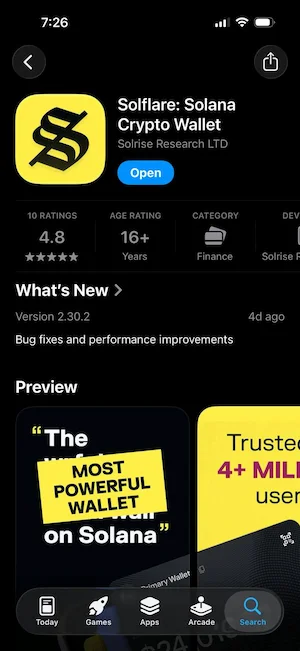
Do not use a link from an ad, a direct message or a search result that looks slightly different. The official installation steps for the Solflare wallet extension are also listed in the Solflare documentation.
Solflare wallet extension for Chrome, Firefox and other browsers
- Go to solflare.com and open the download page.
- Pick your browser. Chrome, Brave, Edge, Opera and Arc use the Chrome Web Store. Firefox uses the Mozilla add-on page.
- Check that the publisher is Solflare and that the listing shows many users and reviews.
- Click Add to Chrome or Add to Firefox and confirm.
- Open the puzzle icon in the toolbar and pin the Solflare icon so it stays visible.
Solflare app for iPhone and Android
Search for Solflare: Solana Crypto Wallet in the App Store or Google Play and check that the developer is Solrise Research. The listings are rated around 4.8 on iOS and 4.6 on Android. The app is free, and you can set it up with a new wallet or import an existing one.
How to spot a fake download
- The link came from an ad, a reply under a post or a direct message.
- The site is hosted on a free page builder or has a name with a small spelling change.
- The extension has very few users or only a handful of reviews.
- Any wallet that asks you to enter the recovery phrase to verify or claim something.
How to set up Solflare wallet
Setup of the Solflare wallet takes about five minutes and works the same way on the extension, the web app and the phone. For a broader walkthrough that applies to any wallet, see how to create a Solana wallet.
Create a new wallet in the extension
- Open the extension or the web app and choose I need a new wallet.
- Write the recovery phrase on paper, in the exact order shown.
- Confirm the phrase by entering the words the app asks for.
- Set a password for this browser.
- Open the wallet and copy your address from the Receive screen.
Import an existing wallet
Choose the option for a wallet you already have and enter the recovery phrase. Phrases from Phantom and other Solana wallets are compatible. If the balance looks empty after the import, the wallet may be reading a different derivation path, so pick another path and check again.
Quick Login with Google or Apple
Solflare added Quick Login in late September 2026. It replaces the password with a six digit passcode and a Google or Apple sign in, and Solflare keeps an encrypted backup of the recovery phrase. It is easier for beginners, but it adds a dependence on the login account and the service. Keep a paper copy of the phrase even if you use it.
Back up the recovery phrase the right way
- Write it on paper and keep it offline, ideally in two places.
- Never take a screenshot, save it in cloud notes or send it in a message.
- Never give it to support staff, because real support never asks for it.
- Remember that whoever holds the phrase owns the wallet.
How to use Solflare wallet
Send, receive and buy
Open Receive to see your address and QR code. To send, pick the token, paste the address, enter the amount and confirm. Check the first and last characters of the address and send a small test amount first when the transfer is large. You can also buy SOL with a card inside the app.
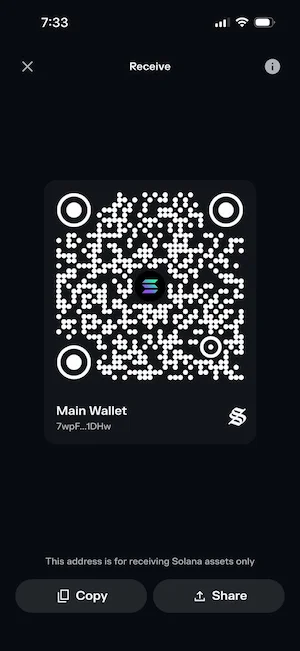
The purchase goes through payment partners, and spreads on card payments often add 1% to 5% to the price.
Swap tokens with Jupiter
Open the swap screen, choose the two tokens and review the quote. The default slippage of 0.5% is a tolerance, which means the trade fails or adjusts if the price moves more than that. It is not a fee charged by the wallet.
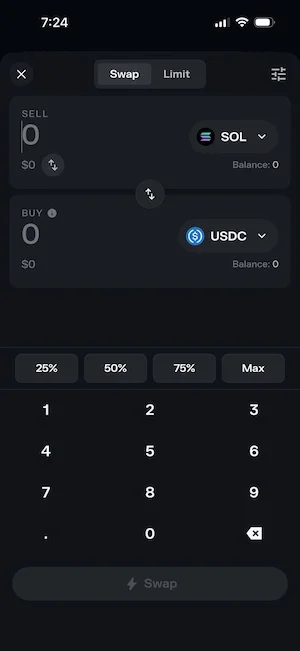
Compare the amount you receive, not only the percentage shown.
Stake SOL and unstake it
Staking locks SOL with a validator, and in return you earn rewards that have recently been around 6% to 7% a year. The rate changes with the network, so check the number in the app. A new native stake needs at least 1 SOL, and about 0.002 SOL is held for the stake account and returned when it is closed. Choose a validator with a low commission and a good record.
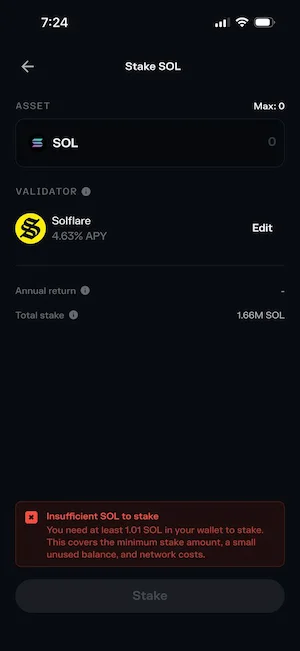
To unstake, start the deactivation in the staking tab and wait until the current epoch ends, which usually takes one to three days. After that, use the withdraw action to move the SOL back to your balance. Instant Unstake skips the wait and charges 0.5% to 3% depending on liquidity.
Connect to Solana apps safely
Use the connect button on the app, or open it in the built-in browser on mobile. Read every request before you sign. Disconnecting an app does not cancel a token approval you already gave, so revoke old approvals from time to time. Try new apps with a second wallet that holds a small amount.
Connect a Ledger or Keystone to Solflare
- Update the device firmware and install the Solana app on it.
- Connect the Ledger by USB, enter its PIN and open the Solana app.
- In the Solflare web app or extension, choose the option to connect a hardware wallet.
- Approve the connection on the device and select the account to use.
- Confirm each transaction on the device screen before you sign.
On a phone, Solflare lists the Ledger Nano X for iOS and Android. Keystone Essential and Pro connect by QR code through the web wallet, which needs version 1.29 or later and Multi-Coin firmware M-6.0 or later. In the extension, a Keystone connection is watch-only.
Manage NFTs and hide spam tokens
Solflare shows Solana NFTs, including compressed NFTs, and estimates their value from the floor price of known collections.
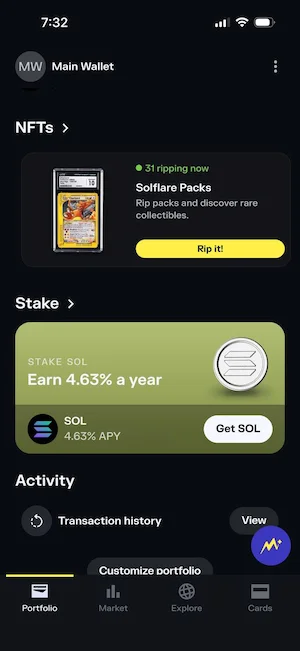
Unknown NFTs and tokens often arrive as airdrops that carry a phishing link in the description. Do not click those links, do not try to sell the item and mark it as unverified or hide it from the collectibles view.
Create more than one account
One recovery phrase can open several accounts, which helps you keep savings apart from trading. All accounts under one phrase share the same risk, so a stronger split is a second wallet with its own phrase.
Newer features
- Perps: trading with borrowed funds inside the wallet, not available in the US and UK at the time of writing.
- xStocks and Bridge: tokenized stocks and a bridge for moving assets to Solana.
- Private Send: sends tokens with extra privacy, which also adds another thing to understand before using it.
- Solflare Card: paused since July 2026, so check the app before counting on it.
How to add money to Solflare wallet
There are three ways to put money into the wallet: buy with a card or bank transfer, send from an exchange, or receive from another wallet.
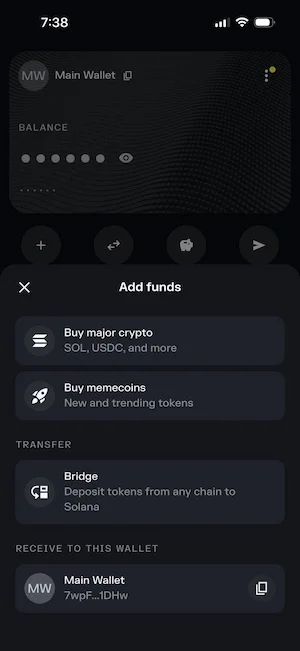
Solflare also explains the transfer flow in its help center article on transferring tokens to your wallet.
Buy SOL with a card or bank transfer
- Open the Buy tab in the app.
- Pick SOL, enter the amount and choose a payment partner.
- Compare the final amount of SOL across providers before you pay.
- Complete the identity and payment steps for that provider.
Card payments usually arrive in minutes. A bank transfer can take about a day but often costs less.
Send crypto from an exchange or another wallet
- In Solflare, open Receive and copy the address for the token you want to add.
- On the exchange, open the withdrawal page and choose the same token.
- Select the Solana network. A different network can send the funds to a place you cannot reach.
- Paste the address, send a small test and then send the rest.
Keep at least 0.01 SOL in the wallet, because every action needs a small fee to pass.
How to put money into my Solflare wallet for free
Nobody gives out real SOL for nothing, so be careful with anything that promises it. The honest routes are project airdrops that reward wallets with past activity, rewards and cashback programs inside apps, and payment for work in crypto. None of these asks you to deposit money first. A site or message that tells you to send SOL to receive more back is a scam.
How do I get free money into my Solflare wallet?
Developers can receive free test SOL from faucets on devnet and testnet. Those tokens have no value and cannot be moved to mainnet in any way. If your goal is a first small balance, the cheapest real option is to buy a small amount of SOL, or send a few dollars from an exchange with low withdrawal fees.
How to withdraw from Solflare wallet
When people ask how to withdraw from Solflare wallet, they mean one of three different things: sending tokens to an exchange, turning crypto into money in a bank account, and taking unstaked SOL back into the wallet. Each one works differently, so pick the one that matches your goal.
Send tokens to an exchange
- On the exchange, open the deposit page for the token and choose the Solana network.
- Copy the deposit address. Every token has its own address on most exchanges.
- In Solflare, tap Send and pick the same token.
- Paste the address, enter the amount and slide or tap to approve.
- Wait for the exchange to credit the deposit.
Some exchanges support only part of the SPL token list, so confirm that your token is accepted before you send it.
Cash out to your bank account
Solflare is a wallet and not a bank, so there is no direct payout to a bank account inside the app. The route is to send the tokens to an exchange, sell them for your local currency and then withdraw to your bank. The exchange sets the fees and the limits. Keep your transaction history for tax records.
Withdraw unstaked SOL
- Open the Staking tab and select the stake you want to close.
- Choose Unstake and confirm the deactivation.
- Wait for the epoch to end, usually one to three days.
- Return to the same stake and use the Withdraw button.
The SOL, the rewards and the small stake account deposit return to your main balance. If you cannot wait, Instant Unstake is the faster option with a fee.
Withdrawal problems and how to fix them
| Problem | Likely cause | What to do |
|---|---|---|
| Deposit not showing on the exchange | Wrong network or the exchange does not support that token | Contact the exchange support with the transaction link |
| SOL seems missing after a transfer | It was sent to a token account, not the main address | Empty the token balance, close the token account and the SOL returns |
| Transaction fails | Not enough SOL for the fee, or network congestion | Keep a small SOL balance and retry |
| No withdraw button on a stake | The stake is not fully deactivated yet | Wait until the epoch ends |
Solflare fees and costs
| Item | Cost | Note |
|---|---|---|
| Network fee | About 0.000005 SOL | Paid in SOL on every transaction |
| Priority fee | Optional, varies | Helps during congestion |
| New token account | About 0.002 SOL | Returned when the account is closed |
| Swap | No fixed wallet fee published | Default slippage is 0.5%, quotes differ |
| Card purchase | Often 1% to 5% | Depends on the provider |
| Instant Unstake | 0.5% to 3% | Depends on liquidity |
| Shield card | 49 to 79 USD | Optional hardware |
The wallet itself is free. Costs come from the network and from the services you choose inside it.
Phantom vs Solflare wallet
Phantom is the main rival of the Solflare wallet, and the two wallets can open the same Solana accounts from one recovery phrase. The full breakdown is in Phantom vs Solflare. The summary is below.
Differences that matter
| Feature | Solflare | Phantom |
|---|---|---|
| Networks | Solana only | Solana, Ethereum, Base, Polygon, Bitcoin and HyperEVM |
| Native Bitcoin and Ethereum | No | Yes |
| Web wallet without an extension | Yes | No, extension and mobile only |
| New native stake on mobile | Yes | Needs the extension |
| Hardware | Ledger, Keystone, Shield | Ledger, including Stax and Flex over Bluetooth |
| Recovery | Phrase or Quick Login | Phrase or Google or Apple login |
| Swap cost | Jupiter, 0.5% default slippage | 0.85% on selected pairs |
| Published audits | 2023 Snap audit only | Reports from 2021 and 2024 |
Phantom or Solflare wallet: which one to pick
- Pick Solflare if you hold only Solana assets, want to stake from your phone, or want a web wallet.
- Pick Phantom if you also hold native Bitcoin or Ethereum, or you want a Google or Apple login.
- Using the same phrase in both is possible, but it gives both apps access to the same keys and doubles the places where it can leak.
MetaMask users should know that the Solflare MetaMask Snap was shut down on May 11, 2026. Whether MetaMask can handle Solana without it is covered in does MetaMask support Solana.
Solflare customer support and user reviews
The Solflare wallet offers a live chat that is open around the clock, a searchable help center and a contact form. There is no phone line. Support can explain features and troubleshoot, but it cannot reset a password or recover a phrase. User ratings are mixed in the way they are for most wallets: about 4.8 on the App Store, 4.6 on Google Play and around 3.8 on Trustpilot. Complaints mostly cover failed transactions, spam tokens and lost funds after phishing. Support will never message you first, so treat any direct message from a Solflare agent as fake.
Solflare alternatives
The right alternative depends on what you need that Solflare does not cover. Phantom is the closest rival and the best pick for Bitcoin and Ethereum holders. Trust Wallet and MetaMask support many chains, but their Solana tools are less focused. A hardware wallet suits large balances better than any extension, and it can be used together with Solflare.
| Wallet | Best for | Main difference from Solflare |
|---|---|---|
| Phantom | Solana plus Bitcoin and Ethereum | More networks, extension needed to start a native stake |
| Backpack | Traders who want an exchange built in | Built-in exchange and xNFT apps |
| Trust Wallet | Mobile users with many chains | Wider network list, less Solana depth |
| Ledger | Long-term storage of larger balances | Keys stay offline, works with Solflare as the interface |
Traders who want a built-in exchange can read the Backpack wallet overview before choosing.
Common Solflare problems
Solflare wallet login and forgot password
The extension password is stored locally in each browser, so it is different on every device and Solflare never sees it. If you forget it, use Forgot your password on the login screen and enter the recovery phrase to set a new one. Without the phrase there is no way back in, and support cannot reset it. With Quick Login, you sign in with the six digit passcode instead.
Balance not showing after import
- Paste your address into a Solana block explorer and confirm that the funds are there.
- Refresh the wallet and switch the RPC endpoint in settings.
- Check that you opened the right account and the right derivation path.
- Update or reinstall the app, but only after you confirm the phrase is safe on paper.
Transactions failing
The usual causes are a balance too low for the fee, a swap with very tight slippage, an old quote, or a busy network. Keep a small amount of SOL, refresh the quote and retry. If the issue repeats, raise the priority fee or wait a few minutes.
Invalid mnemonic phrase error
This message usually means a typo, a word in the wrong place, an extra space or the wrong number of words. Compare each word with your paper copy, one by one, and type them instead of pasting. Never test a phrase on a website to find the error.
Ledger transactions not showing
If a Ledger account looks empty, reconnect the device, open the Solana app and check that the same account and derivation path are selected. Confirm the history on a block explorer, since the funds stay on chain no matter what the screen shows.
Can stolen tokens be recovered?
No. Solflare cannot reverse a transfer or take tokens back from another address. If the tokens went to an exchange, report it there, because an exchange can sometimes freeze an account.
Final verdict
The Solflare wallet is a good, safe choice for Solana users who value a clear interface, simple staking and hardware options. Its limits are the single chain and a thin public audit record. Download it only from official sources, write the recovery phrase on paper, read what you approve and keep a small balance of SOL for fees. If you hold Bitcoin or Ethereum directly, pair it with another wallet or choose Phantom.
FAQ
Is Solflare wallet free?
Yes. Downloading and using the wallet costs nothing. You pay network fees, any costs of the swap or card purchase providers, and the price of optional hardware such as Shield.
Does Solflare support Bitcoin and Ethereum?
No. Solflare handles Solana only. It can show Solana tokens that represent Bitcoin or Ethereum, but they do not give you a native Bitcoin or Ethereum address.
Can Solflare support recover my recovery phrase?
No. The phrase is created on your device and Solflare does not store it, so support has nothing to restore. Write it down at setup and keep it offline.
Can I use the same recovery phrase in Phantom?
Yes, compatible Solana phrases open the same accounts in both wallets. This is not a backup, because both apps hold access to the same funds and share the same risk if the phrase leaks.
Is Solflare available in my country?
The wallet can be downloaded in most places, but some features depend on location, such as Perps, card purchases and the Solflare Card. The app shows what is available for you.
Can I prompt a Solflare transaction without connecting my wallet?
You can send someone a link or QR code that opens Solflare with a payment or transaction request, using deeplinks or Solana Pay. You still have to open the wallet and approve it. No one can send a transaction from your wallet without your signature.
Is Solflare wallet open source?
Only in part. Solflare publishes SDKs, token tools and a blocklist, but a full reproducible build of the current wallet client is not public. Phantom is also not fully open source.
Was Solflare hacked?
No breach of the Solflare systems has been documented. The 2022 drain that affected Solana wallets came from the Slope wallet, which stored recovery phrases on a central server.
Does Solflare have two factor authentication?
No external two factor option such as an authenticator code is offered. Protection comes from the password or passcode, biometrics on the phone and, for larger balances, a hardware wallet.