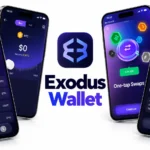
Exodus Wallet is one of the oldest software wallets on the market, and it still appears in almost every list of beginner picks. This Exodus Wallet review covers what the app does, how it protects your keys, what it costs and where it falls short. If you are asking what is Exodus Wallet and whether it suits your needs, the answer is below, together with a clear check on whether Exodus Wallet is safe for everyday use.
Exodus is a self-custody wallet for desktop, mobile and browser. The company launched it in 2015, and it now supports more than 50 crypto networks. That makes this Exodus crypto wallet a common first step for people who want to hold their own keys without learning technical tools.
This guide also covers the parts most reviews skip: copycat apps and websites, how to pair a hardware wallet, and how to move funds in from a Tangem card. Each one has its own section.
Exodus Wallet Quick Verdict
- Best for: beginners and holders of several coins who want one self-custody app on phone, desktop and browser.
- Safe for everyday use: yes, with a clean device, a paper backup of the 12 words and a hardware wallet for larger balances.
- Main weak points: no 2FA, partly closed source, swap spreads and no phone support.
- Cost: free to download, with a spread on swaps and provider fees on card purchases.
- Not ideal for: heavy DeFi use, shielded privacy coins and large balances kept in one hot wallet.
Exodus Wallet at a Glance
| Detail | Exodus |
|---|---|
| Wallet type | Self-custody hot wallet |
| Platforms | Windows, macOS, Linux, iOS, Android and browser extension |
| Networks | 50+ crypto networks, with custom tokens on popular Web3 networks |
| Backup | 12-word secret recovery phrase, plus passkey backup on mobile |
| Hardware wallets | Trezor on desktop, Ledger on mobile |
| Two-factor authentication | Not supported |
| Price | Free to download, swaps include a spread |
| KYC for core wallet use | No |
| Company | Exodus Movement, Inc. (NYSE American: EXOD) |
What Is Exodus Wallet?
What Is an Exodus Wallet and Who Makes It?
An Exodus wallet is a free software app that stores the private keys for your coins and tokens on your own device. You can send, receive, swap and stake from one screen, and the app shows your whole portfolio with price charts. Exodus never holds your funds, so the company cannot freeze or move them. This makes the Exodus cryptocurrency wallet a non-custodial tool, the opposite of keeping coins on an exchange.
The app comes from Exodus Movement, Inc., a company based in the United States. JP Richardson and Daniel Castagnoli founded it in 2015.
Is Exodus a Decentralized Wallet?
Exodus is non-custodial, and that is what most people mean when they ask this. There is no account, no email login and no company server that holds your coins. Your keys are created and encrypted on your device. Still, the app is a company product, parts of the code are closed, and swaps run through third-party providers. So it is self-custody, but not decentralized in every part of how it works. Self-custody also does not mean private, so see can Exodus wallet be tracked in the safety section below.
Is Exodus a Web3 Wallet?
Yes, through the Exodus Web3 Wallet, a browser extension for Chrome and Brave. It connects to decentralized apps on Ethereum, BNB Smart Chain, Solana, Polygon, Cardano, Avalanche C-Chain and other networks, and it works with sending, swaps and NFTs. The main desktop and mobile app is built more like a multi-chain portfolio wallet, so the extension is the better pick when you want to use dApps. Users who come from MetaMask often ask whether MetaMask supports Solana, which is one reason the multi-chain approach of Exodus appeals to them.
Who Owns Exodus and Is It a Legit Company?
Exodus Movement completed a Regulation A public offering in 2021 that raised about 75 million dollars, and its shares now trade on NYSE American under the ticker EXOD. The company files reports with the SEC, which is rare for a wallet brand. It also runs a public bug bounty program on HackerOne. None of this removes the normal risks of a hot wallet, but it does show that Exodus is a real, long-running business.
Exodus Wallet Features
The Exodus cryptocurrency wallet bundles swaps, staking and NFTs into one app. Before the feature list, a quick answer to two common searches. Is Exodus a web3 wallet? Yes, with the extension. Is Exodus a decentralized wallet? It is self-custody, with the limits explained above.
Supported Coins and Networks
This Exodus crypto wallet supports 50+ networks and lists close to 270 assets on its assets page, including Bitcoin, Ethereum, Solana, Cardano, BNB, XRP, Litecoin and many stablecoins. You can also add custom tokens on many networks when a token is not listed. The Exodus wallet crypto list changes with each release, so check the assets page or the status page before you send anything. Solana has full support, and anyone new to that chain can read what Solana is before holding it.
Some limits apply. Zcash shielded addresses are not supported, so fully private ZEC transfers are not possible inside the app. Support for an asset can also differ between desktop, mobile and the extension.
Unsupported Assets and the Status Page
A coin on the assets list of Exodus Wallet is not always ready to use. Exodus keeps a status page that shows which assets work for sending, receiving and swapping, and an asset can be paused when a network has problems or an upgrade. Check that page before a large transfer. Never send a coin to an Exodus address on a network the app does not support, because the funds can be lost for good. Match the coin and the network every time, for example the same token on Ethereum or on Solana are two different things.
Built-in Swaps and Buying Crypto
The Exchange feature lets you swap one asset for another without opening an exchange account.
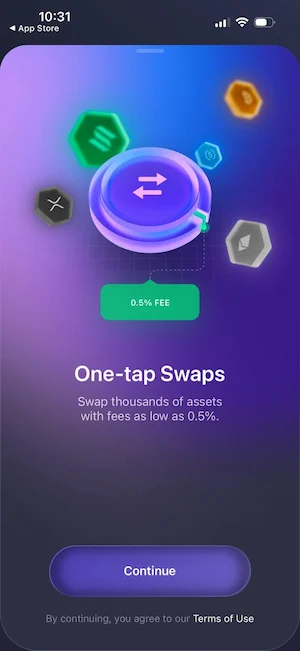
Exodus sends the order to third-party providers, and the quote on screen shows what you send, what you receive and the network fee before you confirm.
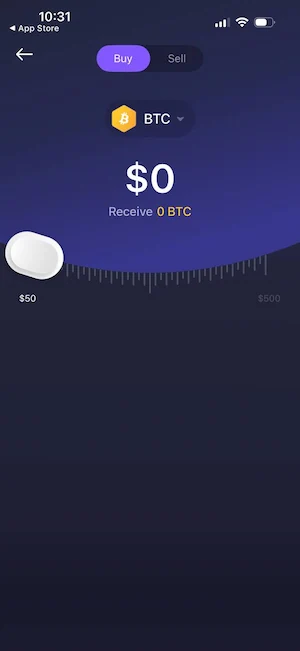
Exodus earns its money from the spread inside these swaps. You can also buy crypto with a card, Apple Pay or Google Pay through partner providers, and those providers may ask for identity checks.
How the Built-in Exchange Works
Exodus Wallet is not an exchange. When you tap Swap, the app sends your coins to a third-party exchange provider, and that provider sends the new asset back to your wallet. The first step is a normal on-chain transaction, so a network fee applies. Providers set floating minimum and maximum amounts per order, and you can repeat swaps as often as you like. The quote shows what you send, what you receive and the network fee before you confirm. In the Web3 Wallet, swaps run through both decentralized and centralized providers, and cross-chain swaps use the same type of outside services.
Speed depends on the provider and the network, and busy networks slow things down. If a swap takes longer than expected, open the swap history, copy the order ID and send it to support.
Use it for small and medium swaps, switching between popular coins and cases where you do not want to move funds to an exchange. Avoid it for large trades and thin pairs, because the spread grows when prices move fast or liquidity is low, as Exodus states in its own help center.
Staking and Rewards
You can stake selected proof-of-stake coins inside the app, including Cardano, Solana, Cosmos and Ethereum. The rewards screen shows an estimated APY, and the figure can change over time. Unstaking can take days, and Cosmos has an unbonding period of about 21 days. Anyone planning to stake the native Solana coin should first learn what SOL is and how rewards work. Staking is not available from a Trezor portfolio inside Exodus.
Staking Risks and APY
The APY on the rewards screen is an estimate. The real return changes with network rules, the number of stakers and the price of the coin, and a high number does not protect you from a drop in price. Some networks lock your coins for a waiting period after you unstake, so the funds can be out of reach when you want to sell. Read the terms for each coin before you start, stake only an amount you can leave untouched and keep a small balance for network fees.
NFT Gallery and Marketplace
The NFT gallery shows collectibles on Ethereum and Solana, and the Solana marketplace runs through a Magic Eden integration. You can view, send and receive NFTs from the same wallet. Some network and format gaps exist, so confirm the token standard and the network before you send an NFT, and keep a little of the network coin for the fee.
Interface and Ease of Use
The design is the main reason people choose Exodus Wallet. The home screen shows your portfolio value, an animated chart and a list of assets, and every action sits one tap or one click away. New users can send, receive and swap with no setup beyond the backup. The mobile app mirrors the desktop version, which makes it easy to switch between them. Some users on older phones report occasional lagging, so keep the app and the operating system updated.
Mobile, Desktop and Web3 Wallet Compared
| Version | Best for | Hardware wallet | Notes |
|---|---|---|---|
| Mobile (iOS and Android) | Daily use, buying crypto, passkey backup | Ledger Nano X and Flex, Trezor Safe 7 over Bluetooth | Face ID, fingerprint or passcode lock |
| Desktop (Windows, macOS, Linux) | Portfolio view, larger swaps, Trezor | Trezor over USB | Password protected, phrase in the Backup tab |
| Web3 Wallet (browser extension) | dApps, NFTs, DEX and cross-chain swaps | Check the support pages for current status | Separate password, no passcode lockout |
Exodus Wallet Download and Setup
An Exodus wallet download takes a few minutes, and the whole setup is quick if you have paper and a pen ready for the recovery phrase.
Exodus Wallet Download: Official Sources Only
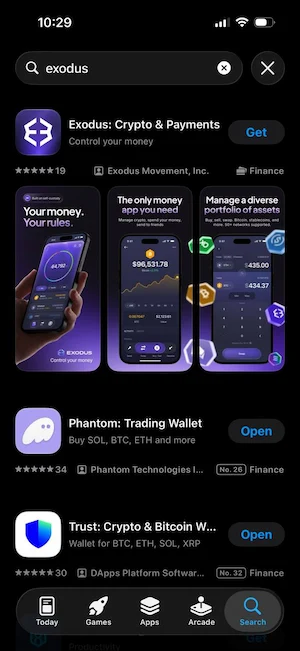
Get the app only from exodus.com, the Apple App Store or Google Play. The publisher must be Exodus Movement, Inc. The desktop version is available for Windows, macOS and Linux, and the Web3 Wallet extension is listed for Chrome and Brave. When you download Exodus Wallet from any other link, you risk a fake Exodus wallet that steals your phrase, so type the address yourself or use the store listing.
How to Set Up Exodus Wallet on iPhone
Here is how to set up Exodus Wallet on iPhone, step by step.
- Open the App Store, search for Exodus and check that the publisher is Exodus Movement, Inc. Tap Get.
- Open the app and choose the option to create a new wallet. Exodus builds the wallet for you, with no email or registration.
- Tap the wallet icon, swipe down to the profile screen and tap Secret Key. Write the 12 words on paper in the right order. The app blocks screenshots on this screen, and you should not store the words in a notes app or cloud folder.
- Optional: create a passkey backup with iCloud. The backup file is encrypted and the passkey is the only way to open it, so do not delete either one.
- Lock the app with Face ID or a passcode. Exodus Mobile can use the lock of your phone or its own passcode, depending on your settings.
- Pick an asset, tap Receive and copy your address. Send a small test amount first.
If you only want to hold Solana, this guide on how to create a Solana wallet shows the same basic steps for a single chain.
Setup on Android and Desktop
On Android the steps are the same, except that you secure the app with fingerprint instead of Face ID. On desktop, download the installer for your system, open it and let Exodus create a wallet. Then go to Settings, open the Backup tab, view your secret recovery phrase, write it down and set a password. You can sync desktop and mobile with a QR code, and both apps then show the same wallet.
System Requirements and Compatibility
Exodus Wallet runs on most current devices, and the mobile and desktop versions of Exodus Wallet have different minimums. The help center lists these minimum requirements:
| Platform | Minimum requirement |
|---|---|
| iPhone and iPad | iOS 16 or higher |
| Android | Android 10 or higher |
| macOS | macOS 12 or higher |
| Windows | Windows 10 or higher, 64-bit with an x64 processor |
| Linux | 64-bit, latest or LTS release of a major distribution, x64 processor |
| Desktop memory | 8 GB of RAM for the best performance |
The Exodus Wallet app may still work on older systems, but Exodus does not promise support or performance there. The help center also lists newer recommended versions, so update your system when you can.
How to Back Up and Restore Your Wallet
Your 12-word phrase is all you need to restore the wallet on a new device. Install Exodus, choose Restore, enter the words and set a new password. Exodus support cannot recover a lost phrase, because the company never has a copy. A Trezor or Ledger connected to Exodus has its own separate phrase, which also needs a safe offline copy.
How to Send, Receive and Withdraw From Exodus Wallet
How to Send Crypto
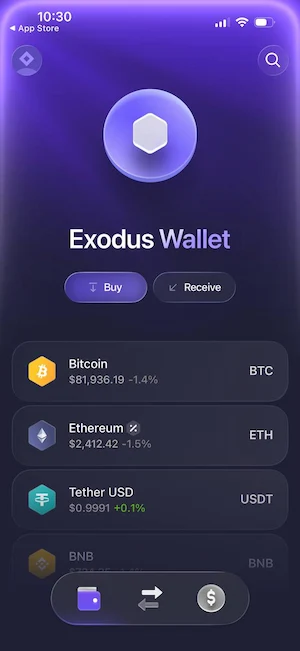
- Open the asset you want to send from Exodus Wallet and tap Send.
- Paste the address or scan the QR code. Compare the first and last characters.
- Choose the right network when the app asks, and make sure the receiving wallet uses the same one.
- Enter the amount and check the network fee.
- Confirm the transaction. A transfer on a blockchain cannot be reversed, so send a small test amount first.
How to Receive Crypto
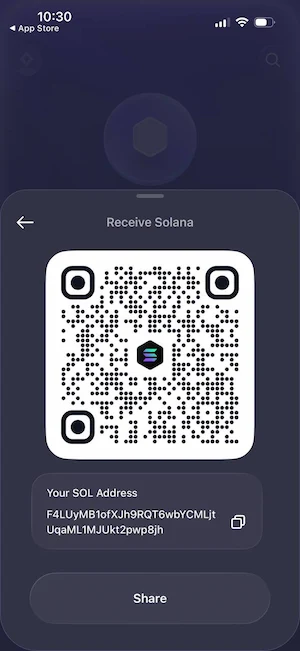
Open the asset, tap Receive and copy the address or show the QR code. Each network has its own address format, so a Bitcoin address cannot receive Ethereum. Pick the correct network on both sides before you send anything.
How to Withdraw Money to Your Bank
Exodus Wallet is not a bank, and the app has no button that sends crypto straight to a bank account. There are two ways to get cash. The first is to sell inside the app through a partner provider, where the option exists in your region. The payout, the fee and the identity check depend on that provider. The second is to send the coins to an exchange account, sell them there and withdraw the money to your bank. Check the deposit network and the minimum amount on the exchange before you send.
Is Exodus Wallet Safe in 2026?
People search for is Exodus wallet safe 2026 more than any other question, and for everyday amounts the answer is yes, as long as you keep your device clean and your recovery phrase offline. Exodus is a hot wallet, so it runs on a device connected to the internet, and its safety depends on that device and on your habits. Reviewers also point out that it has no two-factor authentication.
How Exodus Protects Your Keys
Exodus creates your keys on your device and encrypts them there. They are never stored on Exodus servers. Access is protected by a password on desktop and by a passcode, Face ID or fingerprint on mobile. The company runs a bug bounty program, does manual audits of the open-source parts it depends on and releases updates on a regular schedule. Good habits matter just as much as the app, and this list of ways to keep Solana safe applies to any hot wallet.
Security Weaknesses You Should Know
- No 2FA. Exodus has no accounts or servers that hold your keys, so standard two-factor codes do not fit its design.
- Partly closed source. Many components are open source, but the full app is not, so outside reviewers cannot check every line.
- Hot wallet risk. Malware, keyloggers or a stolen unlocked phone can expose your funds.
- One phrase controls everything. Whoever has the 12 words has the wallet, and nobody can reverse a transfer.
- No recovery service. If you lose the phrase and the device, the funds are gone.
Has Exodus Ever Been Hacked?
Reviews from Coin Bureau, Cryptonews and others found no record of a breach of the Exodus systems or its key storage. Losses reported by users came from phishing pages, infected computers and phrases shared with scammers. In short, the weak point is usually the user device, not the company.
Is Exodus a Cold Wallet?
No. Exodus on its own is a hot wallet, because the keys sit on a phone or computer that goes online. It becomes a cold storage setup only when you pair it with a hardware wallet, which keeps the keys offline and signs transactions on the device.
Hot Wallet vs Hardware Wallet: Safety Comparison
| Point | Exodus alone | Exodus with Trezor or Ledger |
|---|---|---|
| Where the keys live | On your phone or computer | On the hardware device, offline |
| Malware risk | Higher, an infected device can expose the wallet | Lower, you confirm each transaction on the device |
| Recovery phrase | 12 words from Exodus | Separate phrase from the hardware device |
| Staking | Available on selected networks | Not available from the Trezor portfolio |
| Convenience | Fastest | You must connect the device to send |
For any balance you cannot afford to lose, use the hardware option and keep Exodus Wallet for small, everyday amounts.
Can Exodus Wallet Be Tracked?
Your address and transactions are visible on the public blockchain, as with every wallet, and Exodus does not hide them. Anyone who links your address to your name can follow your activity. Exodus does not require KYC for core wallet use and states that it does not collect advertising identifiers or sell usage data. Partner services for buying and swapping can have their own identity checks, so read their terms first.
Staying Safe With Exodus
- Set a strong password for Exodus Wallet on desktop, and use Face ID, fingerprint or a passcode on mobile.
- Keep the 12 words on paper in a safe place, and never type them into a website or send them in a message.
- Update the app and your operating system when new versions arrive.
- Install only software you trust, and avoid cracked programs, which often carry malware.
- Check the first and last characters of every address, and send a small test amount first.
- Keep large balances on a hardware wallet.
Fake Exodus Wallet and Scams to Avoid
A fake Exodus wallet is the most common way users lose money, because scammers copy the name, the colors and the support style. The same tricks show up across chains, and the guide on Solana scams lists many of them.
Fake Apps, Installers and Websites
- Websites with a name that looks right but uses a different spelling or an accent letter, copying the design of exodus.com.
- Apps in stores that use the Exodus name and logo but come from another publisher.
- Installers or update files sent by email, ads or chat. Install only from exodus.com or the official app stores.
- Pages that ask you to restore or verify your wallet by typing your 12 words.
Exodus keeps a list of current scam types in its guide to crypto scams. The rule is simple: the app never asks for your phrase after setup, apart from a restore on a new device.
Fake Support Numbers and Phishing Emails
Exodus has no phone support. Any number that claims to be Exodus is a scam, including numbers that appear on forum posts, PDF files and search results. Support works by email and through the help center. Emails about wallet verification, a required backup or a new card feature are also common phishing messages. Open the app on your own and do not click the button inside the email.
What to Do If You Entered Your Recovery Phrase
Treat the wallet as exposed. Create a new wallet with a new phrase on a clean device and move your funds right away, starting with the most valuable assets. Revoke any dApp approvals you gave and scan the device for malware. Ignore anyone who offers to recover stolen coins for a fee, because that is usually a second scam.
Using a Hardware Wallet With Exodus
A hardware wallet is the best upgrade for a large balance. Exodus supports two brands, but not in the same way on every device.
Trezor on Desktop and Ledger on Mobile
Exodus Desktop works with Trezor Model T, Model One, Safe 3, Safe 5 and Safe 7. After you connect it by USB and unlock it with your PIN, the Trezor shows up as a separate portfolio, and you must plug it in to send funds. Trezor Safe 7 also pairs with Exodus Mobile over Bluetooth. On mobile, Exodus supports Ledger Nano X and Ledger Flex over Bluetooth for Bitcoin, Ethereum, Solana, Base, Polygon and Tron. Set up the device first in Trezor Suite or Ledger Live (Exodus explains the Trezor steps in its Trezor on Exodus Desktop guide), and keep its phrase separate from your Exodus phrase. Staking is not available from the Trezor portfolio. If you are still choosing a brand, this comparison of Ledger vs Trezor helps. Is Exodus a cold wallet? Not by itself. The hardware device is what makes it one.
Connect Tangem to Exodus Wallet to Transfer Crypto
Exodus support pages list only Trezor and Ledger, so there is no direct pairing with a Tangem card. You can still move funds between the two with a normal blockchain transfer. This is how to connect Tangem to Exodus Wallet to transfer crypto without a live link between them:
- In Exodus, open the asset you want to receive and tap Receive.
- Check the network, then copy the address.
- In the Tangem app, choose the same asset on the same network and tap Send.
- Paste the Exodus address and compare the first and last characters.
- Enter a small test amount, review the network fee and confirm by tapping your Tangem card on the phone.
- When the test arrives, send the rest the same way.
The same steps work in the other direction. If a page offers a phone number for help with Tangem or Exodus transfers, it is a scam.
Exodus Wallet Fees
The app is free. Exodus charges nothing to download, store, send or receive. You pay the network fee, and the full amount of that fee goes to the blockchain and not to Exodus. When you move Exodus wallet crypto to another address, the fee depends on how busy that network is.
| Action | Cost |
|---|---|
| Download and store | Free |
| Send and receive | Network fee only |
| Swap | Spread, varies by pair and size, shown in the quote |
| Buy with card | Provider fee, often higher than a swap |
| Staking | No Exodus fee, network rules apply |
| Hardware wallet use | No Exodus fee |
The swap spread is where Exodus makes its money. Exodus advertises rates starting at 0.5% on some pairs, and reviewers report higher costs on smaller or less liquid pairs, with some quoting several percent. On a swap of 1,000 dollars, a 1% spread costs about 10 dollars. For large or frequent trades, compare the Exodus quote with an exchange before you confirm.
How Exodus Wallet Makes Money
Exodus Wallet is free to use, so its income comes from partners. The main source is the spread built into swaps, which the third-party providers include in their rates. Swaps are widely described as its main source of income. The app also earns from partner fees on card purchases and sales. Exodus says it does not sell user data. The network fee is not part of its income, because 100% of it goes to the network. Since swaps pay the bills, compare quotes before a large trade.
Exodus Wallet Customer Support
Support Channels
- In-app support: open the Support screen in the app and send an email or start a chat with the bot.
- Email: the official address is listed in the help center, and Exodus says its team answers around the clock.
- Help center: guides for setup, backup, swaps, fees and hardware wallets.
Exodus does not offer support by phone or by Telegram, and its team never starts contact through unsolicited emails or calls.
App Ratings and User Feedback
On the App Store the app scores above 4 out of 5 from tens of thousands of reviews. Users praise the design and the ease of use. The common complaints are swap costs, slow performance on some devices and trouble getting funds out after a wrong network or a lost phrase, where support can only explain the steps and cannot reverse anything.
Support Scams to Watch For
One known trick against Exodus Wallet users is a scammer who fills out the Exodus contact form with your email address. You then receive a real automated message from Exodus, followed by a call or email from a fake agent. Treat any unsolicited contact as a scam, and remember that no real agent asks for your recovery phrase.
Exodus vs Trust Wallet, MetaMask and Atomic Wallet
| Wallet | Best for | Hardware support | Swap cost |
|---|---|---|---|
| Exodus | Beginners and multi-chain portfolios | Trezor desktop, Ledger mobile | Variable spread |
| Trust Wallet | Mobile users with broad NFT and token support | Ledger through the extension | DEX liquidity, network fees |
| MetaMask | DeFi on EVM networks | Ledger and Trezor | 0.875% plus gas |
| Atomic Wallet | Simple portfolio holders | None built in | 0.5% plus partner commission |
Exodus is easier for a first-time user across several chains, and it has better hardware options than Atomic. MetaMask is stronger for dApps on EVM networks, and Trust Wallet suits people who stay on mobile. Figures come from late 2025 reviews and can change, so check each fee page. If your main chain is Solana, this list of the best Solana wallets gives more options.
Best Exodus Wallet Alternatives by Use Case
The right alternative to Exodus Wallet depends on what you need most: key storage, dApp access, mobile use or a single chain.
- Hardware security: Trezor, Ledger or Tangem keep the keys offline. Exodus can act as the screen for Trezor and Ledger, while Tangem works as a separate wallet.
- EVM dApps and DeFi: MetaMask is built around Ethereum-compatible networks.
- Mobile first with many tokens: Trust Wallet.
- Solana focus: Phantom, Solflare and Backpack.
A multi-chain app like Exodus trades depth for convenience, and a chain-focused wallet usually offers more tools for one network. Most people who leave Exodus Wallet do so for one of those reasons. This review of the Backpack wallet shows what a Solana-first option looks like.
Exodus Wallet Pros and Cons
Here are the pros and cons that came up most often in this Exodus Wallet review.
Pros
- Clean design and quick setup on desktop, mobile and browser
- Self-custody with no account and no KYC for core use
- Close to 270 listed assets and 50+ networks
- Built-in swaps, staking, NFT gallery and card purchases
- Trezor and Ledger support
- Email support and a large help center
Cons
- No two-factor authentication
- Not fully open source
- Swap spreads can cost more than exchange fees
- Hot wallet risk on infected devices
- No phone support, and many fake numbers online
- No shielded Zcash transfers
Is Exodus a Good Wallet? Who Should Use It
Is Exodus a good wallet? For most beginners, yes. It fits people who want one app for many coins, a simple backup and a smooth phone and desktop experience. It also fits holders who combine it with a Trezor or Ledger for long-term storage.
It is a weaker choice for large holders who keep everything in one hot wallet, for DeFi users who live on EVM dApps all day, and for users who need shielded privacy transfers or frequent low-fee trading. Solana-focused users may also want to read this comparison of Phantom vs Solflare before they decide.
Final Verdict on Exodus Wallet
So, is Exodus Wallet safe 2026? For daily use and moderate balances, yes. Exodus has a long record, no breach of its own systems and a clear self-custody model. The risks come from missing 2FA, a hot wallet setup and fake copies of the app, and all three are manageable with a hardware wallet and careful downloads. As an Exodus crypto wallet for beginners, it is hard to beat for design and ease of use. If you decide to download Exodus Wallet, use only the official site or store listing, back up the 12 words on paper and keep large amounts on a hardware device. That is the short version of this Exodus Wallet review.
Frequently Asked Questions
Is Exodus wallet safe for beginners?
Yes, for small and medium amounts. Keys stay on your device, the app has a long track record and setup is simple. Beginners should write the 12-word phrase on paper, download only from official sources and avoid sharing the phrase with anyone, including people who claim to be support.
Is Exodus wallet free to use?
Yes. Download, storage, sending and receiving are free apart from the normal network fee. Exodus earns money from the spread in swaps, and card purchases carry fees from the payment provider.
Does Exodus require KYC?
No, not for creating or using the wallet. You do not give a name, email or ID. Third-party services inside the app, such as card purchases, can ask you to verify your identity.
Can I recover Exodus if I lose my phone?
Yes, if you have your 12-word secret recovery phrase or a passkey backup. Install Exodus on a new device, choose Restore and enter the words. Without the phrase or passkey, nobody can restore the wallet, and Exodus support cannot do it for you.
Does Exodus have phone support?
No. Support is available by email and through the help center. Every phone number that claims to belong to Exodus is a scam.
Is Exodus open source?
Partly. Exodus uses many open-source components and publishes some code, but the full wallet apps are closed source. Because of this, outside experts cannot review every part of the code.
Does Exodus support staking?
Yes, on selected networks such as Cardano, Solana, Cosmos and Ethereum. Rewards are estimates, and each network has its own waiting period for unstaking. Staking from a connected Trezor portfolio is not supported.
Is Exodus better than Trust Wallet or MetaMask?
It depends on the use. Exodus Wallet is easier for a first-time user and has Trezor and Ledger support, MetaMask is stronger for dApps on EVM networks, and Trust Wallet suits people who stay on mobile. For dApp work many users keep MetaMask next to Exodus.
How does Exodus make money?
Mainly from the spread in swaps made through its third-party providers, and from partner fees on card purchases and sales. Sending and receiving have no Exodus fee, and the network fee goes fully to the network.
How do I withdraw money from Exodus?
Exodus has no direct bank withdrawal. Sell through a partner provider inside the app where it is available, or send the coins to an exchange, sell them there and withdraw to your bank. Match the network before you send.
What are the disadvantages of Exodus?
No two-factor authentication, partly closed source code, swap spreads that can cost more than an exchange, hot wallet risk on infected devices, no phone support and no shielded Zcash transfers.
Does Exodus support NFTs?
Yes. The NFT gallery supports Ethereum and Solana collectibles, and the Solana marketplace runs through Magic Eden. Confirm the network and token standard before you send an NFT.